Ratatui: implementing background tasks
In the previous post, I explored a structure of a simple interactive Ratatui application. However, the BitTorrent client presents additional challenges: the driver of the application is the download process that works outside the UI-driven render loop. In this section, I’m laying the groundwork for a terminal UI application that does most of its work in the background.
The problem
A typical interactive application performs most of its work in response to user actions. As we saw in the previous post, it’s primarily driven by a render loop that listens and reacts to terminal events.
A BitTorrent client is different, though. It runs autonomously, downloading files without any user input — the core logic is driven by network communication with remote peers. At the same time, the application must remain responsive: the user should be able to quit by pressing a key combination (Escape button, for example), or resize the terminal window, while the download is in progress.
This means we need two logical execution threads running in parallel: one performing the download, and another handling user events. Both threads need the ability to trigger UI updates.
There are different ways to achieve this. The most obvious is using OS-level threads: each logical thread maps to its own OS thread. Another approach, well-suited for I/O-heavy applications, is asynchronous programming, which decouples logical execution threads from physical ones. Potentially, we can get away with a single OS thread to handle both tasks concurrently.
Both approaches can be implemented in Rust, but I’m not yet comfortable diving into Rust’s async programming model. For now, I’ll proceed with a straightforward multi-threaded solution.
Event-driven multi-threaded application
The solution I’d like to implement looks as follows:
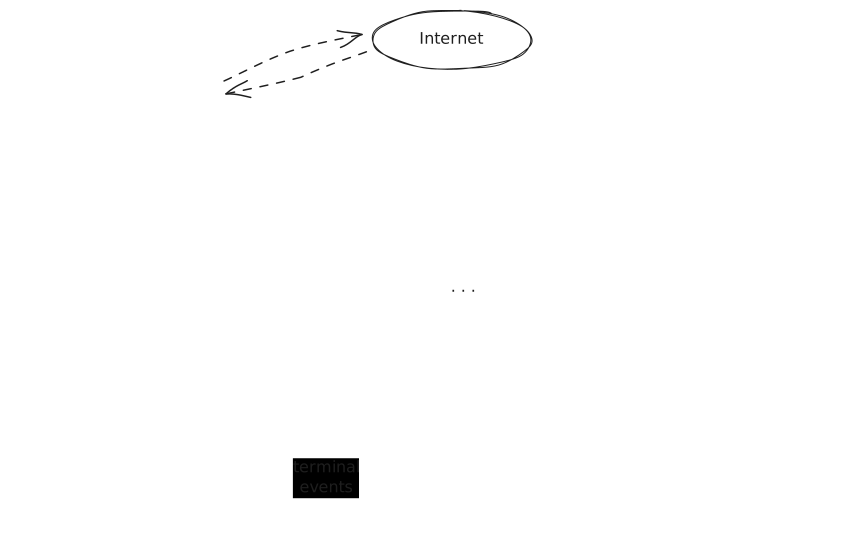
When the application starts, we spawn two execution threads. One thread is dedicated to handling the entire file download process. Another thread is simply listening to the terminal events. They both have access to the shared event channel, to which they send application events when something interesting has happened on their side.
Neither thread is updating the UI directly: instead, they just push events of different kinds into the event channel.
Download thread
From the download thread, we’d like to notify the user about what’s currently going on:
- When probing peers one by one, we’d like to notify the user about which peer we’re currently connecting to;
- When the actual downloading starts, we’d like to update the user each time we receive a new portion of the file.
- When the download has finished, we’d like to quit the application.
User interaction thread
While the download thread is busy downloading the file, another thread is listening to the terminal events to react to user actions:
- When the user presses the
Escapekey, we’d like to interrupt the process and quit the application; - If the user resizes the terminal window, we’d like to redraw the UI to fit the new window size.
Essentially, the task of that thread is to transform interesting terminal events into corresponding application events.
Main app loop thread
On the receiving end of the event channel is our main application render loop that runs in the main application thread. Its task is similar to what we saw before, except that now it listens to the events from the channel:
- It blocks until a new event appears in the channel;
- It processes the event by updating the application state, if needed;
- It re-renders the UI with the updated application state.
The application loop terminates when it receives a certain event: either the download has finished, or the user wants to quit the application by pressing Escape button.
Inter-thread event channel
Now, it’s obvious that we need an implementation for the communication channel, via which the background threads will send the events to the loop. Luckily, message-passing inter-thread communication is a very common task, and Rust’s standard library provides an implementation for such communication in the std::sync::mpsc module. By the way, “mpsc” is an abbreviation for “Multiple Producers, Single Consumer”: multiple threads can send messages to the channel, but only one thread is allowed to receive them.
The function channel() creates an asynchronous communication channel, returning a tuple (sender, receiver). These halves can now be passed to the corresponding threads: the sender goes to the thread that wants to send the messages, and the receiver goes to the receiving thread, respectively.
There can be multiple threads that send the messages to the same channel: the Sender struct implements the Clone trait, so it can be cloned and passed to as many threads as you want. The receiver, however, cannot be shared: only one thread can read the messages from the channel.
Trying out the concept
Before diving into changing the core code, I wanted to try out the entire concept and create a simple UI application that would implement the idea I described above. Let’s suppose that we would like to have a simple UI that visualizes important events happening during the download process:
- At start, I would like to show the user that the client is probing the peers one by one;
- When the download process starts, I want to display the download progress: the total file size and the number of bytes downloaded.
- When the download process finishes, it would signal to the main loop that the work is done and the application can exit.
Application events
We start carving out the data structure for application events as an enum AppEvent. As far as the download events are concerned, we have 3 variants:
Probing(String)with the IP address of the peer;Downloading(usize, usize)with a pair of values(bytes_downloaded, total_bytes);Completedto signal when the download is over.
On the other hand, the user should be able to interrupt the entire process and quit the app by pressing the Escape key. Also, the application should respond to the resizing of the terminal window - that goes without saying. So from the terminal input, we will expect two more kinds of events:
Exitwhen the user presses the Escape key;Resizewhen the terminal window changes its size.
Right now, all these events are encoded as separate variants of the AppEvent enum. In the future, it may make sense to make them more structured and separate data events that are related to the change of the application state, from terminal events that are concerned with the user interaction. So far, however, I’m happy not to complicate things too much.
Application state
The application state is represented by the enum DownloadState, which encodes three possible states of the application:
Idleis the default starting state;Probing(String)as we are trying to connect to peers, with the current peer IP address;Downloading(usize, usize)once we’ve started downloading: bytes downloaded and total bytes, respectively.
It’s notable that AppEvent and DownloadState look very similar. It’s the case for very simple applications, but as the application grows and the UI becomes more complex, I’d expect that events and state would start to diverge considerably.
Application logic
The implementation resides in the App struct. I designated this struct to have the following responsibilities:
- It manages the event channel;
- It contains the application state;
- It is responsible for updating the application state in response to received events;
- It is responsible for processing terminal events and rendering the application state to the UI.
There are quite a few things this struct is responsible for. In general, it’s a bad smell to make a single entity responsible for so many things. I think in the future the single App struct will be split into several more focused entities. For example, managing the application state and applying state updates looks like a good candidate for splitting out. As a starting point, however, it works as it is.
There are two main public methods in this struct. start_background_task() takes a closure as a parameter and runs it in the background thread. Under the hood, it clones the event sender and passes the new sender to the provided closure, so that the background routine can send events to the main thread. This method is a place where we plug in our business logic.
The second method run_ui_loop is the main driver. It starts the main application loop that orchestrates the whole thing: listening for events on the communication channel, updating the application state, and rendering the UI.
Fake it till you make it
I want to see how the whole concept plays out. It would be helpful to see that the UI parts play well together before I dive into refactoring the core logic of the application.
To give me a nice playground, I’ve created a separate binary target main-tui.rs that I’ll be using to try out the UI part of the program. The code of the main() function is very simple, thanks to the App abstraction that does all heavy lifting:
use std::{sync::mpsc::Sender, thread, time::Duration};

use bt_client::ratatui_ui::{App, AppEvent};

type Result<T> = std::result::Result<T, Box<dyn std::error::Error>>;

pub fn main() -> Result<()> {
    let mut ui = App::new();
    ui.start_background_task(download_file);
    ui.run_ui_loop()
}

fn download_file(tx: Sender<AppEvent>) {
    let ip_addresses = vec!["127.0.0.1:6881", "127.0.0.2:6882", "127.0.0.3:6883"];
    for ip_address in ip_addresses {
        tx.send(AppEvent::Probing(ip_address.to_string())).unwrap();
        thread::sleep(Duration::from_secs(2));
    }

    for i in 0..100 {
        tx.send(AppEvent::Downloading(i, 100)).unwrap();
        thread::sleep(Duration::from_millis(100));
    }

    tx.send(AppEvent::Completed).unwrap();
}
To simulate the real work, I’m using a fake download_file() function. This dummy imitates the real download process by sending application events with some delay, putting the thread to sleep in between the steps.
Let’s see now what it looks like in the terminal! When I compile and run main-tui.rs, I can see the following output:
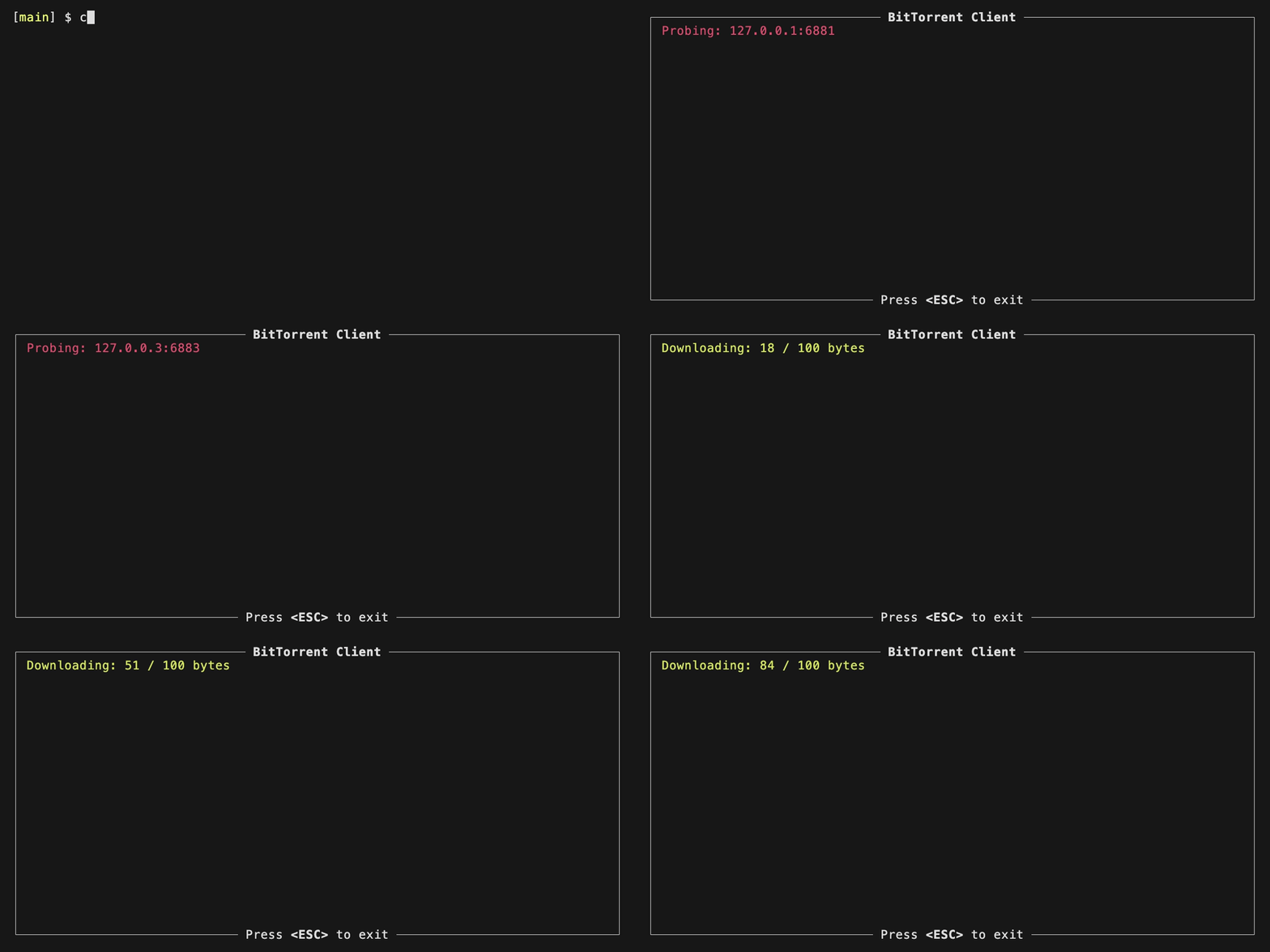
Neat! The UI looks very basic, for sure, but the important part is that the core behaviour is there: we can see now what the downloader is doing behind the curtains.
The application is also responsive to the user input: though not shown in this animation, it handles it nicely when I resize the terminal window. I can also interrupt the entire process by pressing the Escape button, as hinted in the user interface.
Next steps
The main achievement of this section is that I’ve created and tried out the base framework to introduce a nice-ish Ratatui user interface to my BitTorrent client: the solution with several background threads works. Next, I’m going to connect the UI part to the core logic and add some polish to the user interface. Let’s go!