Lines Without Guesswork
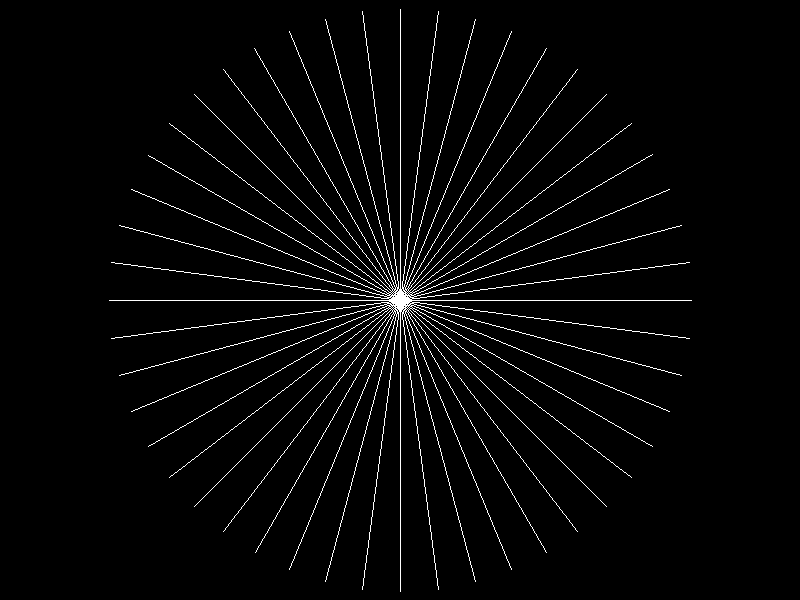
We shipped the second milestone of the rasterizer. This one feels like a real step forward: instead of writing one known pixel, we now draw full line segments across the framebuffer and export the result as a valid lossless WebP.
What changed in practice
Version 0.0.1 proved the output pipeline. Version 0.0.2 expands our drawing capability from single points to full line segments. The key change is a line primitive, draw_line, implemented on top of the existing framebuffer and guarded set_pixel.
The result is still intentionally simple and easy to inspect:
Line drawing algorithm
A notable decision in this milestone was the line algorithm itself. We briefly had an integer Bresenham path while iterating, then switched to DDA: Digital Differential Analyzer.
This was also a deliberate learning choice from Sergey: instead of spending time learning Bresenham in depth right away (a nice exercise, but not our focus right now), we picked the approach that felt closer to the math. We acknowledged this is likely a performance penalty versus a tighter integer-heavy implementation, but at this stage that cost is not very important for us. Better to use an algorithm we understand clearly, then optimize later if profiling says it matters.
What DDA is
A Digital Differential Analyzer is a way to turn a continuous curve into discrete pixel steps. For line drawing, it works like this:
- treat the segment as a parametric function over $t \in [0,1]$
- sample $t$ at evenly spaced values
- compute continuous $(x,y)$ at each sample
- round to the nearest pixel and plot it
DDA implementation for lines
The math is small but useful. Given endpoints $P_0 = (x_0, y_0)$ and $P_1 = (x_1, y_1)$, define:
\[\Delta x = x_1 - x_0,\quad \Delta y = y_1 - y_0,\quad N = \max(\lvert\Delta x\rvert, \lvert\Delta y\rvert).\]Here, $N$ is the number of equal sampling intervals we use along the segment (so we evaluate $N+1$ points including both endpoints). We choose $N$ based on the dominant axis.
By dominant axis, we mean the coordinate that changes more over the whole segment:
- if $\lvert\Delta x\rvert \ge \lvert\Delta y\rvert$, the line is more horizontal, so $x$ is dominant
- if $\lvert\Delta y\rvert > \lvert\Delta x\rvert$, the line is more vertical, so $y$ is dominant.
For example, from $(2,3)$ to $(12,7)$ we have $\Delta x=10$ and $\Delta y=4$, so $x$ is dominant and we use $N=10$. From $(5,1)$ to $(8,13)$ we have $\Delta x=3$ and $\Delta y=12$, so $y$ is dominant and we use $N=12$.
First, let’s write the segment in parametric form for each coordinate:
\[\begin{cases} x(t) = x_0 + \Delta x\,t \\ y(t) = y_0 + \Delta y\,t \end{cases} \qquad t \in [0,1].\]Then sample:
\[t_i = \frac{i}{N}\ \text{for}\ i = 0,1,\dots,N\ \ (\text{so } t_i \in [0,1]),\qquad x_i = x_0 + \Delta x \cdot t_i,\qquad y_i = y_0 + \Delta y \cdot t_i.\]Each $(x_i, y_i)$ is still continuous (floating point), so rasterization needs one more decision: map to a pixel center. Here we use rounding:
\[p^x_i = \operatorname{round}(x_i),\qquad p^y_i = \operatorname{round}(y_i).\]Those integer $(p^x_i, p^y_i)$ coordinates are what set_pixel writes. Because $i$ runs from $0$ through $N$, the segment is endpoint-inclusive by construction.
The key intuition is that $N = \max(\lvert\Delta x\rvert, \lvert\Delta y\rvert)$ guarantees we advance no more than one pixel per step along the dominant axis, which avoids visible gaps in the rasterized line. If a rounded sample lands outside the framebuffer, set_pixel safely ignores it, so we get simple clipping behavior without a separate clipping algorithm yet.
For this milestone, that trade-off is exactly what we wanted: readable geometry-first code, predictable testable output, and a direct bridge from line equations to pixels before we optimize anything.
Testing the shape, not just the function
This milestone also improved tests in a useful way. Instead of only checking individual bytes, we added several line-focused unit tests and a tiny ASCII view helper so expected pixel patterns are readable at a glance.
That gave us confidence in the cases that matter right now:
- horizontal, vertical, and diagonal segments,
- endpoint inclusivity (forward and reverse),
- clipping behavior when endpoints land outside the framebuffer.
Here is the style of unit test we used to verify shape directly:
#[test]
fn draw_diagonal_line_slope_one() {
    let mut fb = FrameBuffer::new(10, 5);
    fb.draw_line(Point(1, 0), Point(4, 3), Rgb::WHITE);

    #[rustfmt::skip]
    let expected = concat!(
        " +        ",
        "  +       ",
        "   +      ",
        "    +     ",
        "          ",
    );
    assert_eq!(fb.to_ascii_art(), expected);
}
This style made expected output much easier to read in code review than raw byte arrays. It also made adding new test cases faster: in many cases, we only needed to change the expected ASCII pattern while keeping the same assertion structure.
The broader integration test still verifies that the binary writes a decodable WebP, so we keep both levels of feedback: local geometry correctness and end-to-end artifact validity.
Why the new output uses radial spokes
The rendered scene is now a radial-spoke pattern: many segments from the image center to a circle. In code, that happens in draw_flower by iterating angles over the entire circle and issuing one draw_line per spoke.
We originally discussed a crossed square for this milestone. That remains a good regression-style scene, but the radial image turned out to be better for quick visual checks:
- missing pixels are obvious,
- endpoint handling is easier to spot,
- small directional asymmetries stand out immediately.
The original plan, a crossed square, would not give us enough visual feedback on line quality. A few simple vertical, horizontal, and diagonal lines provide less information than many radial directions. So Sergey chose to switch the output to radial spokes.
What this version unlocks
This release does not yet include projection, meshes, or triangle filling. But it gives us a dependable primitive that all of that will rely on. The next milestone was orthographic cube projection, where this line path becomes the first wireframe backbone instead of a standalone demo — we shipped that in a cube takes shape.