Downloading some data from the peer
Last time we left off being able to exchange the initial handshake messages with some of the peers. By the end of the session, I had some doubts about what to do next: should I continue working on peer-to-peer communication, or should I elaborate on the code that we already had working? After some reflection, I realized that peer communication was more interesting to move forward with.
It’s a bit of a diversion from my original plan, but I’m eager to take this detour. You see, I still have no idea how to actually download a piece of the file from the remote peer. That makes me anxious: since I don’t know what it’s going to take, I’m very uncomfortable about the design decisions I need to make right now. I hope that if I advance far enough towards the file download, I’ll understand the mechanics of peer communication better, and eventually I’ll be better informed about how to structure the program.
So let’s spearhead a little bit in this direction. The goal of this section is to be able to download at least a single byte of the file from the remote peer. Let’s do it!
Peer message format
Once the TCP connection is established and peers have exchanged the handshake messages, they are ready to start collaborating. The communication is bi-directional and symmetrical, meaning that the messages sent in both directions look the same, and the data flow can go in either direction. On a low level, all peer messages have the same format:
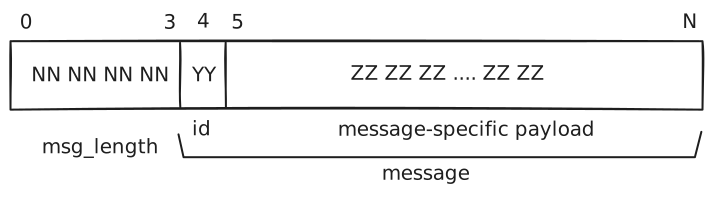
The first 4 bytes are the message length (big-endian integer), followed by the message body. The body itself can be split into two parts: 1 byte for the message type id, and then the type-specific payload, which can have variable length.
A format like that becomes quite handy when it comes to handling unknown messages. Since every message starts with the length, we can always skip over an unknown message by just reading the needed number of bytes from the TCP stream.
It’s also worth mentioning that all integer fields are encoded in 4-byte big-endian format. Endianness is very important when it comes to how multi-byte integers are represented in memory or in the data stream. It determines the order in which bytes appear in the data stream. Big-endian means that the most significant byte comes first, e.g.:
305419896: (0x12345678): 0x12 0x34 0x56 0x78
Big-endian byte order is quite common in network protocols. Little-endian order is more prominent in various processor architectures.
Peer-to-peer communication flow
Compared to the traditional client-server request/response model, the communication between peers in BitTorrent networks involves more ceremony. By its nature, it’s more collaborative and inherently asynchronous. Peers can express interest in each other’s data, notify each other when they start or stop accepting download requests, etc. The whole communication happens asynchronously, meaning that any message can come at any time.
For the purposes of this section, however, we’re going to assume a simpler view of the communication. Remember, our goal right now is to persuade the remote peer to send us a block of the file data. On the high level, the message exchange will resemble the following conversation:
You: Hello!
They: Hello.They: Here are the file blocks I can offer for download.
You: I’m interested!They: I’m ready to listen to your requests.
You: Can you give me 128 bytes of piece index 0?
They: Sure, here you go: 00 01 02 03 …
Let’s see how this dialog maps to the peer messages.
Announcing what we have
It is implied that both peers can offer each other some file pieces for downloading, but at the beginning they don’t know which pieces the other party has. They first exchange the messages that describe what pieces they have to offer, by exchanging the bitfield(id=5) messages. The payload of those messages contains the bitfield that indicates which pieces the peer has available for download.
It’s also possible to notify other peers that we have some new pieces available for download. For example, when our client has finished downloading a new file piece and verified its hash, it should send a have(id=4) message with the index of the newly downloaded piece to its peers.
Expressing interest
Once the peer has received that information from its counterpart, it can express interest in further communication by sending the interested(id=2) message. That message notifies the other party that the client would like to start requesting file blocks, so that the peer can do any necessary preparations.
If for some reason the peer is no longer interested in downloading, it should send the not interested(id=3) message to the remote peer. The remote peer then can free up allocated resources.
The communication always starts in the "not interested" state on both sides.
Choking my peer
It sounds criminal, but peers can also choke each other. Choking means that the peer stops answering requests from the other side (i.e. it chokes its partner). To make it known to its counterpart, the peer sends a choke(id=0) notification message. The client then should stop sending download requests to the peer and consider all pending (sent but unanswered) requests to be discarded by the remote peer.
The opposite action is unchoking, when the peer decides to allow its client to make download requests. It notifies the client about it by sending an unchoke(id=1) notification message.
At the beginning of the communication, both peers start in the choked state. When one of them sends an interested message to the other, that other can eventually allow downloading and send the unchoke message back. However, due to the capricious nature of peer-to-peer communication, there’s no guarantee that we’ll ever receive an unchoke message in return.
It’s also possible that the remote peer decides to choke us at any time.
Download requests
Finally, when all formalities are done (the client sent an interested message to the peer and received an unchoke notification back), we can get to the matter: requesting file content for downloading.
Download requests introduce one more layer of file fragmentation. Remember, we already split the file into pieces, calculate the SHA-1 hash of each piece, and store these hashes in the torrent file. Well, it turns out that it’s not enough. When downloading the contents, we have to split pieces into even smaller blocks. As the specification informs us, the state-of-the-art clients use block sizes no longer than 16KB. What it means for us is that to download the whole piece, we need to make multiple download requests of 16KB (or smaller) blocks.
To request the file block, we should send the request(id=6) message. In this message, we provide the piece index we are interested in, the byte offset within the piece, and the length of the requested block.
If we’re lucky, the peer will eventually send us the requested block in the piece(id=7) message.
Implementing the basic flow to receive a file block
As you can see, there’s quite a bit of chit-chat happening between peers before we can actually receive the block of file data. Fortunately, to get things going, we can strip this communication to the bare minimum and pretend as if it were a linear message exchange:
- Receive
bitfieldmessage from the peer; - Send
interestedmessage back; - Receive
unchokenotification; - Send a
requestmessage to request the very first 128 bytes of the file (piece index = 0, byte offset = 0, length = 128) - Receive
piecemessage with the requested file block.
This is a very simplified view of peer-to-peer communication. In real life, there’s no guarantee this communication will go so smoothly. For example, the connected peer may not have any pieces for download, so it won’t send us the bitfield message. Or, it may be busy at the moment, so we won’t ever receive the unchoke notification. Nonetheless, I’m feeling lucky!
PeerMessage enum
To represent different peer messages, I’ve created the PeerMessage enum. As the name suggests, this enum represents different kinds of peer messages. Functionality-wise, PeerMessage can construct itself from io::Read and write its contents into io::Write. Essentially, I’ve written a bespoke serialization/deserialization mechanism that complies with the peer message format.
Since currently we only need a subset of messages, and not all of them need to be sent or received, I’ve provided only the bare minimum of serialization/deserialization, deferring the rest to the future. I’d also like to explore the options of using third-party libraries to perform the serialization because that code is pretty boring to write.
Connecting to the peer
Building upon the previous functionality, we find the first peer that responds to the handshake with the help of the connect_to_first_available_peer function:
fn connect_to_first_available_peer(
    peers: &[Peer],
    info_hash: Sha1,
    peer_id: PeerId,
) -> Option<FileDownloader> {
    for peer in peers {
        print!("{}:{}\t-> ", peer.ip, peer.port);
        match probe_peer(&peer, info_hash, peer_id) {
            Ok((result, downloader)) => {
                println!("OK({})", result);
                return Some(downloader);
            }
            Err(e) => println!("Err({})", e),
        }
    }
    None
}
Peer discovery is still done synchronously: we try to connect to the peers one by one, waiting for them to respond with a timeout of 5 seconds. This is absolutely not the solution you’d like to see in production: if the first 30 peers happen to be unresponsive, it would take us 30 * 5 = 600 seconds until we finally encounter the first responsive peer! I’m going to need to do something about it. Probing peers in parallel looks like a viable solution.
download_file_block() function
The download_file_block() function in main.rs quite literally implements the communication flow from above to request first N bytes from the beginning of the data file (piece index = 0, byte offset = 0):
fn download_file_block(
    downloader: &mut FileDownloader,
    block_length: u32,
) -> Result<Vec<u8>, Box<dyn Error>> {
    let bitfield = downloader.receive_bitfield()?;
    println!("* Received bitfield: {}", hex::encode(bitfield));

    println!("* Sending `interested` message");
    downloader.send_interested()?;

    println!("* Receiving `unchoke` message");
    downloader.receive_unchoke()?;

    println!("* Unchoked, requesting data block");
    downloader.request_block(0, 0, block_length)?;

    println!("* Receiving `piece` message");
    let (piece_index, offset, block) = downloader.receive_piece()?;
    println!(
        "* Received block of piece {} at offset {}: {} ",
        piece_index,
        offset,
        hex::encode(block.clone())
    );
    Ok(block)
}
To make the code look smoother, I’ve added a few helper methods to the FileDownloader interface. They are essentially just wrappers around PeerMessage send/receive functionality, with additional checks that the correct message type was received.
Checking the result
Finally, I wanted to make sure that we receive the correct file block. In order to do that, I’ve put a test data file into the test-data directory. Essentially, it’s the first 16KB of the original Debian ISO file that we’re supposed to download.
Once we receive the file block from the peer, we can compare the contents of that block with the test file. If they match, that means we managed to download a part of the file successfully!
Give it a try!
Let’s now run our updated main routine and see if we can communicate with a peer that cares to respond:
[main] $ cargo run --quiet
* Total pieces 2680, piece length 262144

* Your announce url is: http://bttracker.debian.org:6969/announce
* Total 50 peers
* Probing peers...
85.134.8.12:51413       -> OK("-TR3000-ev59bulyuscr")
* Connected to peer: 85.134.8.12:51413
* Received bitfield: ffffffffffffffffffffffffffffffffffffffffffffffffffffffffffffffffffffffffffffffffffffffffffffffffffffffffffffffffffffffffffffffffffffffffffffffffffffffffffffffffffffffffffffffffffffffffffffffffffffffffffffffffffffffffffffffffffffffffffffffffffffffffffffffffffffffffffffffffffffffffffffffffffffffffffffffffffffffffffffffffffffffffffffffffffffffffffffffffffffffffffffffffffffffffffffffffffffffffffffffffffffffffffffffffffffffffffffffffffffffffffffffffffffffffffffffffffffffffffffffffffffffffffffffffffffffffffffffffffffffffffffffffffffffffffffffffffffffffffffffffffffffffffffffffffffffffffffffffffffffffffffffffffffffffffffffffffffffffffffffffffffffffffffffffffffffffffffff
* Sending `interested` message
* Receiving `unchoke` message
* Unchoked, requesting data block
* Receiving `piece` message
* Received block of piece 0 at offset 0: 455208000000909000000000000000000000000000000000000000000000000033edfa8ed5bc007cfbfc6631db6631c96653665106578edd8ec552be007cbf0006b90001f3a5ea4b06000052b441bbaa5531c930f6f9cd13721681fb55aa751083e101740b66c706f306b442eb15eb0231c95a51b408cd135b0fb6c6405083e1


* RECEIVED BLOCK MATCHES SAMPLE DATA
[main] $
I got lucky this time, and the very first peer in the list accepted the connection. It’s also fortunate that the peer happens to have the entire file, as we can see from the received bitfield (all bytes are 0xff, meaning that it has all file pieces).
Next we went through the entire message flow and managed to receive the file block back. Finally, our sanity check passed: the received file block matches the beginning of the test data file! Hooray!
What I’ve learned so far
This section was a deeper dive into the BitTorrent protocol. Let’s briefly summarize what we’ve learned so far:
- Peer protocol is symmetrical and asynchronous: the same messages go in both directions;
- Peers start the communication in
chokedandnot_interestedstates; - To start requesting file blocks, the client should send an
interestedmessage to the peer and wait until it receives anunchokenotification from the peer; - Downloads happen in blocks no longer than 16KB in length. Each file piece (in terms of the torrent file) is longer than 16KB, so multiple download requests are needed to download the whole piece.