First integration test
I’m about to start doing some serious changes to the core logic of the download process. However, before diving in head-first, I would like to strengthen my test suite by introducing the first integration test that would utilize a real BitTorrent client as a remote peer. Moreover, I would like to create a controlled test environment, so that test execution will not rely on anything that lives somewhere else on the internet and therefore is outside of my reach.
The need for the integration tests
Until now, I was primarily relying on the suite of unit-level tests to drive the development forward. That served me pretty well so far, but now I’m at the point where I feel that having only unit tests is not sufficient.
One reason is that at this point I already have a working solution, and I would like to keep it functioning as I introduce more features related to the core of the BitTorrent client. I expect that there will be quite a bit of refactoring of the application structure, so having a high-level test that’s decoupled from the internals is going to be helpful when it comes to making serious design changes.
The second reason is that I’m about to start playing with some pretty low-level stuff, such as (spoiler alert!) non-blocking and asynchronous I/O, and I suspect that some aspects will be hard to test using only unit tests. So far I have been testing the application end-to-end by just launching the main application, but it’s quite tedious and time-consuming to do so as often as I would like to.
Finally, as I’m moving towards unknown grounds, I would like to have a local environment with a real BitTorrent client that I could use to write and quickly check any experimental code against it, instead of relying on some kind of mocked solution. Mocks are useful when you know the details of the behaviour of a mocked part, but they are useless when you’re just discovering that behavior.
Hopefully, I’ve persuaded myself and the readers that spending some time on a repeatable integration test in a controlled test environment is a good investment of time and effort, so let’s move on.
Step one: local BitTorrent client
In fact, I’ve already peeked into using a local BitTorrent client installation (using Transmission) when I was experimenting with improving the download speed. Let’s use that experience to start elaborating our first integration test!
Torrent file for tests
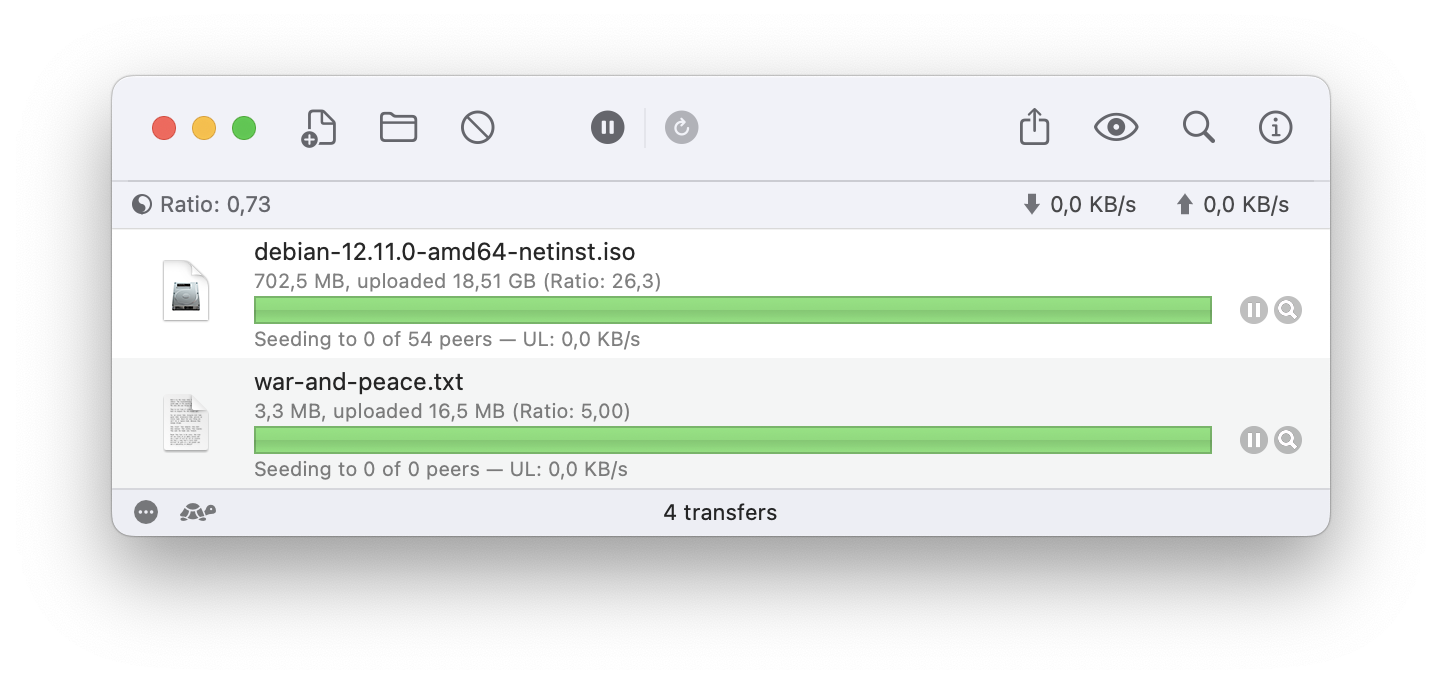
In theory, I could still use the Debian torrent file for integration tests, but its big size makes it cumbersome. Even in the local environment it takes more than 10 seconds to download, and it’s a drag to wait for so long. Luckily, in Transmission it’s pretty easy to create a new torrent from a smaller file of my own choice, and use it in the integration tests. I’ve decided to use the full text of War and Peace by Leo Tolstoy, freely available on the Internet. With a decent size of 3.3 megabytes, it looks like a good pick: not too short and not too big.
My first integration test
Having added this file as a torrent to my local Transmission, I can now write my first integration test:
const DATA_FILE_PATH: &str = "test-env/war-and-peace/war-and-peace.txt";
const TORRENT_FILE_PATH: &str = "test-env/war-and-peace/war-and-peace.torrent";
const LOCAL_IP_ADDRESS: &str = "127.0.0.1:54196";

#[test]
fn download_war_and_peace() -> Result<()> {
    let peer_address = LOCAL_IP_ADDRESS.parse()?;
    let torrent = Torrent::read_file(TORRENT_FILE_PATH)?;
    let peer_id = PeerId::default();

    let (tx, _rx) = mpsc::channel();
    let downloaded = torrent.download_from(vec![peer_address], peer_id, &tx)?;

    assert_eq!(read_test_file()?, downloaded.content);
    Ok(())
}

fn read_test_file() -> Result<Vec<u8>> {
    let content = fs::read(DATA_FILE_PATH)?;
    Ok(content)
}
Run the test, and it passes. The test takes a few seconds to execute, but I can tolerate that:
[main] $ cargo test -q --test wap_download

running 1 test
.
test result: ok. 1 passed; 0 failed; 0 ignored; 0 measured; 0 filtered out; finished in 8.46s
So now we have an integration test that works in the local environment. But I’m not fully satisfied yet: I don’t want to rely on a manually configured Transmission client. I think we can do even better: let’s make a fully automated test environment that does not involve a manual setup!
Step two: Containerized Transmission
Let’s take a step further and remove the need to manually add our test torrent file into Transmission. Fortunately, that’s quite easy to do using Docker. There’s already a Docker image for Transmission container in DockerHub, and we can utilize it for our purposes.
We only need to make a subtle customization to the vanilla image: add our test data file to the /downloads/complete directory in the container, and the torrent file to the /watch directory. We can do that by providing a custom Dockerfile that builds a custom image based on the vanilla image from the DockerHub:
FROM linuxserver/transmission:latest

RUN mkdir /downloads && chmod 777 /downloads
RUN mkdir /downloads/complete && chmod 777 /downloads/complete
RUN mkdir /watch && chmod 777 /watch

COPY war-and-peace/war-and-peace.txt /downloads/complete
COPY war-and-peace/war-and-peace.torrent /watch
When the container starts and Transmission is launched, it looks into the /watch folder for torrent files to add. Since we’ve already placed the data file into the /downloads/complete folder, it picks up that data file and gets ready to serve it. With default configuration, the container exposes TCP port 51413 for BitTorrent communication.
Having introduced the Docker container with that customized setup, I’ve effectively eliminated the need for configuring my local environment manually: the only thing I need to set up the environment from scratch is to build and run the Docker container from the provided Dockerfile, which I will now store along with the source code. Not even Transmission needs to be installed on my local machine!
The second effect of the containerized solution is that I can now more easily introduce other BitTorrent clients, provided that they can be run inside the Docker container. That opens up a lot of possibilities for further tests: I can now have several different BitTorrent clients running in Docker containers, and run the same test against each client. I believe that will come in handy later on.
Notice though, that I still have to build and launch the Docker container manually. Though it is much easier to do than recreate the environment manually from scratch, it’s still a step that separates us from a fully automated test environment.
Let’s address it next.
Step three: automate container management with testcontainers
Just as with many other routine tasks, the problem of building and running containers for tests has been solved for us by the open source community. Enter testcontainers library:
Testcontainers for Rust is a Rust library that makes it simple to create and clean up container-based dependencies for automated integration/smoke tests. The clean, easy-to-use API enables developers to programmatically define containers that should be run as part of a test and clean up those resources when the test is done.
Among many features, testcontainers gives us the ability to build and run containers from custom Dockerfiles directly from the test code, which is exactly what we need!
Additionally, when the container is launched, testcontainers can map its exposed port to a random available host port. The mapped port number can be accessed from the test code, so there’s no need to use a hard-coded port number in tests. Very handy for flexible environment setups!
Finally, testcontainers takes care of the cleanup: when the container is no longer needed, it will be stopped and deleted. By the way, this is not always desirable: sometimes you need to keep the container running after the test for debugging. You can change the default behaviour by setting the environment variable TESTCONTAINERS_COMMAND=keep.
Fully autonomous integration test
When it comes to test code organization, I prefer to keep tests focused and readable. When the test setup starts to get complicated and detail-heavy, I usually extract that code into supporting modules and hide that accidental complexity behind a simple facade.
For our purposes, I’ve created a supporting struct TestEnv to do the heavy lifting of container management:
impl TestEnv {
    pub fn start() -> Result<Self> {
        let image = GenericBuildableImage::new("bt-client-transmission", "latest")
            .with_dockerfile(Self::dockerfile_path())
            .with_file(Self::test_data_dir(), "./war-and-peace")
            .build_image()?;

        let container = image
            .with_exposed_port(51413.tcp())
            .with_wait_for(WaitFor::message_on_stdout("[ls.io-init] done."))
            .start()?;

        Ok(Self { container })
    }

    // ... skipped the rest
}
This struct also provides a few additional methods to isolate the tests from the details of the test environment configuration. That helps me to keep the code of the actual test readable and easy to understand:
#[test]
fn download_file_successfully() -> Result<()> {
    let env = TestEnv::start()?;

    let peer_address = env.get_peer_address()?;
    let torrent = TestEnv::read_torrent_file()?;
    let peer_id = PeerId::default();

    let (tx, _rx) = mpsc::channel();
    let downloaded = torrent.download_from(vec![peer_address], peer_id, &tx)?;
    assert_eq!(TestEnv::read_data_file()?, downloaded.content);

    Ok(())
}
I’ve also added a second integration test for the obvious failing scenario: when the peer doesn’t exist on the other end. Not showing it here for brevity, it’s available on GitHub.
At last, we’ve arrived at the fully automated solution: all I need to have on my local machine is Docker installed. Starting and tearing down the Docker container for each test (that’s what testcontainers does by default) adds a bit of a delay to the test execution, but I think it’s still OK for the integration tests:
[main] $ cargo test -q --test download_file

running 2 tests
..
test result: ok. 2 passed; 0 failed; 0 ignored; 0 measured; 0 filtered out; finished in 11.11s
Good job, time to move forward!
Next steps
With the integration tests in place, I feel very well prepared to dive deep and start making serious changes to the core functionality of this BitTorrent client. The first thing I would like to address is that painfully slow process of probing the peers one by one. There’s a lot of possibilities to improve that: let’s dive in!