Low download speed: looking into the issue
We have reached the milestone when we can download the entire file, but the download speed was frustratingly low. In this section, I’d like to explore this issue and try out some experiments to eliminate the bottleneck. To make the experimentation more reliable, I’m going to set up a BitTorrent client locally so that our investigation is not influenced by random network delays and unpredictable remote peer settings.
Local peer setup
I realized that we could greatly simplify our experiments if we set up the BitTorrent client locally and connected to it directly. After all, all we need to know is the IP address of the peer and the port on which it’s listening for incoming requests. By running it locally, we have full control over the peer settings and network. Having a local setup also enables writing integration tests that don’t depend on anything external.
I’m using Transmission for MacOS as a reference client. To complete the local setup, I’ve registered our .torrent file in the application and waited until it finished downloading. So now we have a BitTorrent client running locally that serves the entire file:
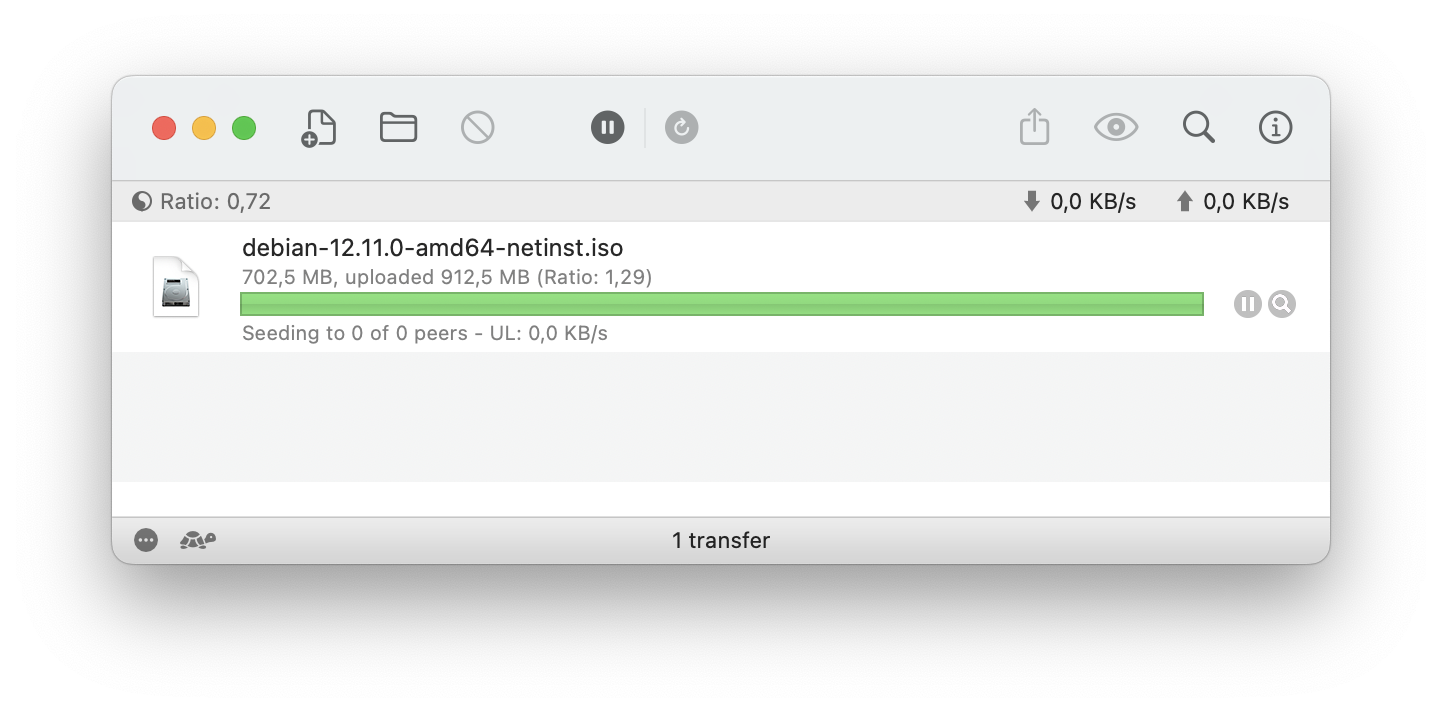
The second thing is the port number on which it’s listening for incoming connections. It can be specified in Transmission’s settings, like this:
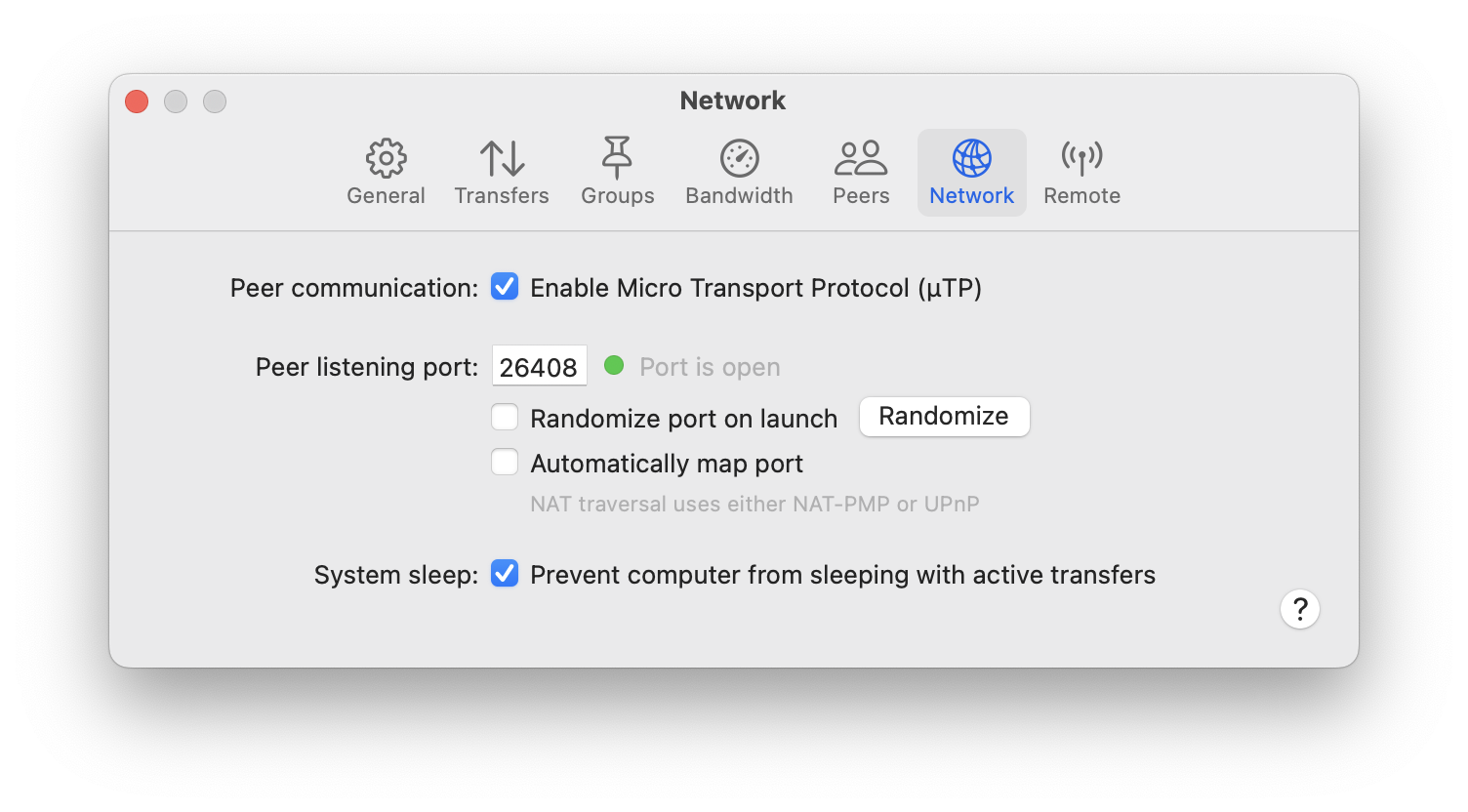
Now I should be able to connect to the local BitTorrent peer at the address localhost:26408. To run the experiments locally, I’ve created a separate binary crate called local_peer. Essentially, I just copied the contents of the main crate and removed everything related to the communication with the torrent tracker. It simply connects to the local peer at the known port:
const LOCAL_PEER_PORT: u16 = 26408;

fn connect_to_local_peer(info_hash: Sha1, peer_id: PeerId) -> Result<PeerChannel, Box<dyn Error>> {
    let socket_addr = format!("127.0.0.1:{}", LOCAL_PEER_PORT)
        .to_socket_addrs()?
        .next()
        .unwrap();
    let mut channel = PeerChannel::connect(&socket_addr)?;
    channel.handshake(info_hash, peer_id)?;
    Ok(channel)
}
Measuring request delays
With a local setup like this, we can start digging deeper into what’s going on with the download speed. The first experiment to make is to measure the time it takes to:
- send the
requestmessage to the peer; - receive the corresponding
pieceresponse.
Let’s do it, printing the times to the console:
[main] $ cargo run --quiet --bin local_peer
* Total pieces 2680, piece length 262144
* Connected to local peer: 127.0.0.1:26408
* Received bitfield: ffffffffffffffffffffffffffffffffffffffffffffffffffffffffffffffffffffffffffffffffffffffffffffffffffffffffffffffffffffffffffffffffffffffffffffffffffffffffffffffffffffffffffffffffffffffffffffffffffffffffffffffffffffffffffffffffffffffffffffffffffffffffffffffffffffffffffffffffffffffffffffffffffffffffffffffffffffffffffffffffffffffffffffffffffffffffffffffffffffffffffffffffffffffffffffffffffffffffffffffffffffffffffffffffffffffffffffffffffffffffffffffffffffffffffffffffffffffffffffffffffffffffffffffffffffffffffffffffffffffffffffffffffffffffffffffffffffffffffffffffffffffffffffffffffffffffffffffffffffffffffffffffffffffffffffffffffffffffffffffffffffffffffffffffffffffffffffff
* Sending `interested` message
* Receiving `unchoke` message
* Unchoked, requesting file
- Downloading piece 0
-- Requesting block: 0 ms
-- Receiving block: 499 ms
-- Requesting block: 0 ms
-- Receiving block: 499 ms
-- Requesting block: 0 ms
-- Receiving block: 499 ms
-- Requesting block: 0 ms
-- Receiving block: 499 ms
-- Requesting block: 0 ms
-- Receiving block: 500 ms
-- Requesting block: 0 ms
-- Receiving block: 499 ms
-- Requesting block: 0 ms
-- Receiving block: 499 ms
-- Requesting block: 0 ms
-- Receiving block: 499 ms
-- Requesting block: 0 ms
-- Receiving block: 499 ms
-- Requesting block: 0 ms
-- Receiving block: 500 ms
-- Requesting block: 0 ms
-- Receiving block: 499 ms
-- Requesting block: 0 ms
-- Receiving block: 500 ms
-- Requesting block: 0 ms
-- Receiving block: 499 ms
-- Requesting block: 0 ms
-- Receiving block: 500 ms
-- Requesting block: 0 ms
-- Receiving block: 499 ms
-- Requesting block: 0 ms
-- Receiving block: 499 ms
- Downloaded piece 0, time: 8036 ms
- Downloading piece 1
-- Requesting block: 0 ms
-- Receiving block: 463 ms
^C
[main] $
That’s a very interesting result! As we can see, the request message is sent instantaneously, but we wait for around 0.5 seconds to receive the piece message in response. And it happens for each block, resulting in 8 seconds to receive the entire piece! Also, remarkably, the delay is fairly constant at around 500 milliseconds. This suggests that Transmission implements some sort of forced delay on its end: it’s highly improbable that downloading 16KB of data via local connection would take almost half a second.
Is there anything we can do about it? Obviously, we can’t change Transmission’s behavior, but there’s one trick we can try on our side: pipelining requests.
An experiment with pipelining requests
While figuring out the download rate issues, I came across a document written by Bram Cohen himself, the author of the BitTorrent protocol: Incentives Build Robustness in BitTorrent. In Section 2.3, this document discusses the importance of request pipelining to achieve good download rates:
When transferring data over TCP, like BitTorrent does, it is very important to always have several requests pending at once, to avoid a delay between pieces being sent, which is disastrous for transfer rates. BitTorrent facilitates this by breaking pieces further into sub-pieces over the wire, typically sixteen kilobytes in size, and always keeping some number, typically five, requests pipelined at once. Every time a sub-piece arrives, a new request is sent. The amount of data to pipeline has been selected as a value which can reliably saturate most connections.
The BitTorrent specification also emphasizes queuing requests for good download rates, although it suggests keeping 10 requests in the queue, as opposed to 5 in the original paper.
So it looks like pipelining (or queuing) requests is key to improving download rate. Let’s run a quick’n’dirty experiment to prove that it’s true.
In this experiment, we’ll request all blocks for the piece at once at the beginning, and then we’ll just collect incoming piece messages until all of them have arrived. It’s a simple change in the code:
fn download_piece_by_block(
    &mut self,
    piece_index: u32,
    piece_length: u32,
) -> io::Result<Vec<u8>> {
    let mut buffer = vec![0; piece_length as usize];

    let block_count = piece_length.div_ceil(self.block_length);

    // Send the requests for all blocks
    for block_index in 0..block_count {
        self.request_block(piece_index, block_index, piece_length)?;
    }

    // Receive the blocks
    for _ in 0..block_count {
        let block = self.receive_block()?;
        let block_offset = block.offset as usize;
        let block_length = block.data.len();
        buffer[block_offset..(block_offset + block_length)].copy_from_slice(&block.data);
    }
    Ok(buffer)
}
Running this version, we get the following output in the console:
[main] $ cargo run --quiet --bin local_peer
* Total pieces 2680, piece length 262144
* Connected to local peer: 127.0.0.1:26408
* Received bitfield: ffffffffffffffffffffffffffffffffffffffffffffffffffffffffffffffffffffffffffffffffffffffffffffffffffffffffffffffffffffffffffffffffffffffffffffffffffffffffffffffffffffffffffffffffffffffffffffffffffffffffffffffffffffffffffffffffffffffffffffffffffffffffffffffffffffffffffffffffffffffffffffffffffffffffffffffffffffffffffffffffffffffffffffffffffffffffffffffffffffffffffffffffffffffffffffffffffffffffffffffffffffffffffffffffffffffffffffffffffffffffffffffffffffffffffffffffffffffffffffffffffffffffffffffffffffffffffffffffffffffffffffffffffffffffffffffffffffffffffffffffffffffffffffffffffffffffffffffffffffffffffffffffffffffffffffffffffffffffffffffffffffffffffffffffffffffffffffff
* Sending `interested` message
* Receiving `unchoke` message
* Unchoked, requesting file
- Downloading piece 0
-- Requesting block: 0 ms
-- Requesting block: 0 ms
-- Requesting block: 0 ms
-- Requesting block: 0 ms
-- Requesting block: 0 ms
-- Requesting block: 0 ms
-- Requesting block: 0 ms
-- Requesting block: 0 ms
-- Requesting block: 0 ms
-- Requesting block: 0 ms
-- Requesting block: 0 ms
-- Requesting block: 0 ms
-- Requesting block: 0 ms
-- Requesting block: 0 ms
-- Requesting block: 0 ms
-- Requesting block: 0 ms
-- Receiving block: 499 ms
-- Receiving block: 0 ms
-- Receiving block: 0 ms
-- Receiving block: 0 ms
-- Receiving block: 0 ms
-- Receiving block: 0 ms
-- Receiving block: 0 ms
-- Receiving block: 0 ms
-- Receiving block: 0 ms
-- Receiving block: 0 ms
-- Receiving block: 0 ms
-- Receiving block: 0 ms
-- Receiving block: 0 ms
-- Receiving block: 0 ms
-- Receiving block: 0 ms
-- Receiving block: 0 ms
- Downloaded piece 0, time: 536 ms
- Downloading piece 1
-- Requesting block: 0 ms
-- Requesting block: 0 ms
-- Requesting block: 0 ms
-- Requesting block: 0 ms
-- Requesting block: 0 ms
-- Requesting block: 0 ms
-- Requesting block: 0 ms
-- Requesting block: 0 ms
-- Requesting block: 0 ms
-- Requesting block: 0 ms
-- Requesting block: 0 ms
-- Requesting block: 0 ms
-- Requesting block: 0 ms
-- Requesting block: 0 ms
-- Requesting block: 0 ms
-- Requesting block: 0 ms
-- Receiving block: 463 ms
-- Receiving block: 0 ms
-- Receiving block: 0 ms
-- Receiving block: 0 ms
-- Receiving block: 0 ms
-- Receiving block: 0 ms
-- Receiving block: 0 ms
-- Receiving block: 0 ms
-- Receiving block: 0 ms
-- Receiving block: 0 ms
-- Receiving block: 0 ms
-- Receiving block: 0 ms
-- Receiving block: 0 ms
-- Receiving block: 0 ms
-- Receiving block: 0 ms
-- Receiving block: 0 ms
- Downloaded piece 1, time: 500 ms
^C
[main] $
Wow, that’s a dramatic difference! Now we waste no time waiting for file blocks to arrive; it happens instantly. The only time we still experience the delay is when receiving the very first block of a piece, still waiting for 500 milliseconds. I bet we can eliminate this delay as well if we also pipeline the requests across the piece boundaries.
Next step
This experiment has shown us that request pipelining is definitely the way to go to improve the download speed. Now, let’s revert all experimental changes and focus on the proper implementation of this algorithm.