<?xml version="1.0" encoding="utf-8"?><feed xmlns="http://www.w3.org/2005/Atom" ><generator uri="https://jekyllrb.com/" version="3.10.0">Jekyll</generator><link href="https://tindandelion.com/rust-3d-rasterizer/feed.xml" rel="self" type="application/atom+xml" /><link href="https://tindandelion.com/rust-3d-rasterizer/" rel="alternate" type="text/html" /><updated>2026-05-19T09:23:29+00:00</updated><id>https://tindandelion.com/rust-3d-rasterizer/feed.xml</id><title type="html">3D Rasterizer in Rust</title><subtitle>A personal learning project: a 3D software rasterizer in Rust (CPU first, optional wgpu later). This diary covers progress, experiments, and what I learn along the way.</subtitle><entry><title type="html">The Bug: The Near Face Was Classified as Back</title><link href="https://tindandelion.com/rust-3d-rasterizer/2026/05/19/the-near-face-was-classified-as-back.html" rel="alternate" type="text/html" title="The Bug: The Near Face Was Classified as Back" /><published>2026-05-19T08:00:00+00:00</published><updated>2026-05-19T08:00:00+00:00</updated><id>https://tindandelion.com/rust-3d-rasterizer/2026/05/19/the-near-face-was-classified-as-back</id><content type="html" xml:base="https://tindandelion.com/rust-3d-rasterizer/2026/05/19/the-near-face-was-classified-as-back.html"><![CDATA[<p><a href="/rust-3d-rasterizer//2026/05/18/the-cube-paints-its-six-faces.html">Version 0.0.6</a> shipped the filled, six-color cube — a real milestone. Back-face culling arrived one release earlier, in <a href="/rust-3d-rasterizer//2026/05/17/the-cube-sheds-its-hidden-edges.html">Version 0.0.5</a>, with <a href="https://github.com/tindandelion/rust-3d-rasterizer/blob/0.0.5/src/scene/cube/face.rs#L41"><code class="language-plaintext highlighter-rouge">CubeFace::is_back</code></a> driving <a href="https://github.com/tindandelion/rust-3d-rasterizer/blob/0.0.5/src/scene/cube.rs#L49"><code class="language-plaintext highlighter-rouge">Cube::visible_edges</code></a>. Little did we know the sign in that helper was backwards relative to <a href="https://github.com/tindandelion/rust-3d-rasterizer/blob/0.0.7/src/ortho_camera.rs#L75"><code class="language-plaintext highlighter-rouge">Camera::direction</code></a> — we had shipped the wrong facing test without noticing. The mistake stayed hidden until we started the lighting milestone on top of the filled cube.</p>

<p>We had to come up with a small patch release. We are documenting it because the mistake is easy to repeat and instructive if you are learning facing tests.</p>

<p><a href="https://github.com/tindandelion/rust-3d-rasterizer/tree/0.0.7" class="no-github-icon">Version 0.0.7 on GitHub</a></p>

<h2 id="what-you-will-see">What you will see</h2>

<p>The tumbling animation looks almost the same at a glance — still a faceted cube, still six colors, still back faces culled. The difference is which facets count as “back.” Believe it or not, <strong>we were culling wrong faces up until now!</strong></p>


<p><img src="https://raw.githubusercontent.com/tindandelion/rust-3d-rasterizer/0.0.7/doc/output/current.webp" alt="Faceted cube with corrected front-face culling" /></p>

<p>The bug is really subtle to spot on a simple scene like this. Only when we started to work on lighting did we spot oddities between what we expected to see and what was actually rendered.</p>

<h2 id="how-we-spotted-the-bug">How we spotted the bug</h2>

<p>At first, everything went according to plan. Right after the filled-cube release we started on the next item in the <a href="https://github.com/tindandelion/rust-3d-rasterizer/blob/main/doc/planning/project-breakdown.md">project breakdown</a>: Cube: basic shading — simple lighting on the faceted cube.</p>

<p>While placing a directional light in the scene, Sergey got confused and then suspicious. No matter how he aimed it, the cube would not read as lit from the front the way he expected. That felt wrong long before we had a precise diagnosis — the nudge to stop tuning light vectors and ask whether the pipeline was showing the faces he thought it was.</p>



<p>Eventually we stepped back from lighting and investigated our back-face culling. To make the picture clear, we added <a href="https://github.com/tindandelion/rust-3d-rasterizer/blob/0.0.7/src/bin/still-unit-cube.rs#L1"><code class="language-plaintext highlighter-rouge">still-unit-cube</code></a> — a small export binary that renders the default unit cube in the identity pose, square-on through the same orthographic camera as the main exporters, with no tumble and no extra transform. We also changed <a href="https://github.com/tindandelion/rust-3d-rasterizer/blob/0.0.7/src/lib.rs#L36"><code class="language-plaintext highlighter-rouge">CUBE_FACE_PALETTE</code></a> so the faces toward and away from the camera are impossible to confuse: deep blue on the −Z face (slot 0, the near face) and red on the +Z face (slot 1, the back face).</p>

<p>We ran the binary and opened the WebP. We expected a <strong>blue</strong> square in the middle of the frame; it was <strong>red</strong> — we were painting the back of the box!</p>

<p>Only then did we go hunting in the <a href="https://github.com/tindandelion/rust-3d-rasterizer/blob/0.0.5/src/scene/cube/face.rs#L41"><code class="language-plaintext highlighter-rouge">is_back</code></a> helper we added in 0.0.5 and the tests that had been feeding the wrong view vector into the facing check. The sections below are that chase.</p>

<h2 id="our-convention-for-face-culling">Our convention for face culling</h2>

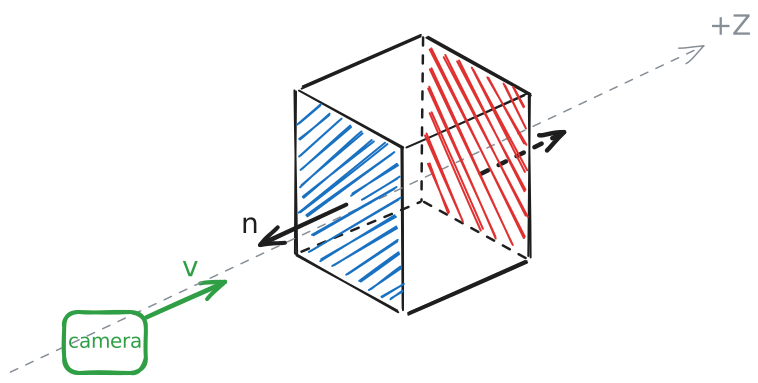
<p>Our orthographic camera looks into the scene along +Z, matching <code class="language-plaintext highlighter-rouge">Camera::direction</code>.</p>

<p>Each <a href="https://github.com/tindandelion/rust-3d-rasterizer/blob/0.0.7/src/scene/cube/face.rs#L9"><code class="language-plaintext highlighter-rouge">CubeFace</code></a> stores an outward unit normal $\mathbf{n}$. For the cap closest to the eye (the −Z side of a unit cube centered at the origin), $\mathbf{n}$ points toward −Z — opposite to $\mathbf{v}$.</p>

<p><img src="/rust-3d-rasterizer/assets/images/facing-convention-n-v.svg" alt="Outward normal on the near cap points opposite to into-scene view (+Z)" /></p>

<p>So for a facet that should be drawn when you look down +Z:</p>

\[\mathbf{n} \cdot \mathbf{v} &lt; 0\]

<p>The outward normal and the into-scene view direction point against each other. That is front-facing in our setup.</p>

<h2 id="what-went-wrong">What went wrong</h2>

<p><a href="https://github.com/tindandelion/rust-3d-rasterizer/blob/0.0.5/src/scene/cube/face.rs#L41"><code class="language-plaintext highlighter-rouge">CubeFace::is_back</code></a> had the sign convention backwards from the day we introduced it in 0.0.5. It returned true when $\mathbf{n} \cdot \mathbf{v} &lt; 0$ — but that is exactly the condition we just agreed means front-facing. In other words, <code class="language-plaintext highlighter-rouge">is_back</code> labeled front-facing facets as back-facing and treated genuinely back-facing facets as “not back.”</p>

<p><a href="https://github.com/tindandelion/rust-3d-rasterizer/blob/0.0.5/src/scene/cube.rs#L49"><code class="language-plaintext highlighter-rouge">Cube::visible_edges</code></a> skipped edges on faces where <code class="language-plaintext highlighter-rouge">is_back</code> was true. When we added fills in 0.0.6, <a href="https://github.com/tindandelion/rust-3d-rasterizer/blob/0.0.6/src/scene/cube.rs#L67"><code class="language-plaintext highlighter-rouge">Cube::visible_faces</code></a> kept every face with <code class="language-plaintext highlighter-rouge">!is_back</code>, i.e. $\mathbf{n} \cdot \mathbf{v} \geq 0$. Either way, the pipeline culled the faces toward the camera and kept the faces on the far side of the box.</p>

<p>With $\mathbf{v} = +Z$ as in production:</p>

<table>
  <thead>
    <tr>
      <th>Cap</th>
      <th>Outward $\mathbf{n}$</th>
      <th>$\mathbf{n} \cdot \mathbf{v}$</th>
      <th>Actually</th>
      <th><code class="language-plaintext highlighter-rouge">is_back</code> said</th>
      <th><code class="language-plaintext highlighter-rouge">!is_back</code> kept?</th>
    </tr>
  </thead>
  <tbody>
    <tr>
      <td>Near (−Z)</td>
      <td>−Z</td>
      <td>&lt; 0</td>
      <td>front</td>
      <td>back</td>
      <td>no — culled</td>
    </tr>
    <tr>
      <td>Far (+Z)</td>
      <td>+Z</td>
      <td>&gt; 0</td>
      <td>back</td>
      <td>not back</td>
      <td>yes — filled</td>
    </tr>
  </tbody>
</table>

<p>The helper was not merely misnamed: its predicate was the inverse of back-facing for outward normals and an into-scene view vector. We were filling the back of the box and dropping the side facing the viewer — exactly what the blue/red still had shown.</p>

<h2 id="why-the-tests-did-not-catch-it-sooner">Why the tests did not catch it sooner</h2>

<p>The tests and production disagreed because they used opposite view vectors: several unit tests passed <code class="language-plaintext highlighter-rouge">Vec3::NEG_Z</code> as $\mathbf{v}$ and asserted counts like five visible faces from the front, while the camera supplies +Z through <code class="language-plaintext highlighter-rouge">Camera::direction</code>. With −Z as $\mathbf{v}$, the wrong inequality accidentally labels the near cap as visible and the far cap as back — so the tests passed while production painted the wrong side.</p>

<p>An older check only required that some visible quad matched the −Z corner layout, using the same inverted view vector. It never required that only the near cap survived culling with the real camera axis.</p>

<p>Sergey added <a href="https://github.com/tindandelion/rust-3d-rasterizer/blob/0.0.7/src/scene/cube.rs#L190"><code class="language-plaintext highlighter-rouge">looking_at_cube_from_front</code></a>: default cube, <code class="language-plaintext highlighter-rouge">look_along_z_axis = Vec3::Z</code>, exactly one visible face, and that face’s corners are the −Z quad. That test failed immediately and pinned the bug.</p>

<h2 id="the-fix">The fix</h2>

<p>We replaced the inverted rule with an explicit <a href="https://github.com/tindandelion/rust-3d-rasterizer/blob/0.0.7/src/scene/cube/face.rs#L47"><code class="language-plaintext highlighter-rouge">is_front_facing</code></a> on 0.0.7:</p>

\[\text{front-facing} \iff \mathbf{n} \cdot \mathbf{v} &lt; 0\]

<p><a href="https://github.com/tindandelion/rust-3d-rasterizer/blob/0.0.7/src/scene/cube.rs#L72"><code class="language-plaintext highlighter-rouge">Cube::visible_faces</code></a> filters on that predicate only. Grazing facets ($\mathbf{n} \cdot \mathbf{v} = 0$) are excluded as well, which matters for fills: from a cardinal view you should see one cap, not five side faces edge-on.</p>

<p><code class="language-plaintext highlighter-rouge">Cube::visible_edges</code> now uses the same front-facing rule as fills, so wireframe and face culling finally match <code class="language-plaintext highlighter-rouge">Camera::direction</code>. We first noticed the mistake in the filled exporters; the old <code class="language-plaintext highlighter-rouge">is_back</code> helper is gone.</p>

<p>Tests that describe “from the front” now take <code class="language-plaintext highlighter-rouge">Vec3::Z</code>, matching the camera. An integration test renders the default unit cube through <a href="https://github.com/tindandelion/rust-3d-rasterizer/blob/0.0.7/src/lib.rs#L65"><code class="language-plaintext highlighter-rouge">draw_faces</code></a> and compares the framebuffer to a hand-built golden image — one blue square for palette slot 0 (−Z cap), no WebP snapshot required.</p>

<h2 id="what-comes-next">What comes next</h2>

<p>This release was a small detour: correct facing, then back to basic shading on the <a href="https://github.com/tindandelion/rust-3d-rasterizer/blob/main/doc/planning/project-breakdown.md">project breakdown</a> — a light direction and a simple diffuse term on the faceted cube, still with quads and no depth buffer.</p>]]></content><author><name></name></author><summary type="html"><![CDATA[Version 0.0.6 shipped the filled, six-color cube — a real milestone. Back-face culling arrived one release earlier, in Version 0.0.5, with CubeFace::is_back driving Cube::visible_edges. Little did we know the sign in that helper was backwards relative to Camera::direction — we had shipped the wrong facing test without noticing. The mistake stayed hidden until we started the lighting milestone on top of the filled cube.]]></summary></entry><entry><title type="html">The Cube Paints Its Six Faces</title><link href="https://tindandelion.com/rust-3d-rasterizer/2026/05/18/the-cube-paints-its-six-faces.html" rel="alternate" type="text/html" title="The Cube Paints Its Six Faces" /><published>2026-05-18T08:00:00+00:00</published><updated>2026-05-18T08:00:00+00:00</updated><id>https://tindandelion.com/rust-3d-rasterizer/2026/05/18/the-cube-paints-its-six-faces</id><content type="html" xml:base="https://tindandelion.com/rust-3d-rasterizer/2026/05/18/the-cube-paints-its-six-faces.html"><![CDATA[<p><a href="/rust-3d-rasterizer//2026/05/17/the-cube-sheds-its-hidden-edges.html">Version 0.0.5</a> left the cube as a clean wireframe: back faces culled, cornflower-blue strokes, no see-through cage. The natural next step was always solid facets — six flat colors, one per side, still without lighting or a depth buffer. Version 0.0.6 ships that look. The exporters now fill visible quads instead of drawing twelve edges.</p>

<p><a href="https://github.com/tindandelion/rust-3d-rasterizer/tree/0.0.6" class="no-github-icon">Version 0.0.6 on GitHub</a></p>

<h2 id="what-you-will-see">What you will see</h2>

<p>Same orthographic camera, same Euler tumble, 360 frames at 50 fps — but the cube is a faceted solid: different colors on the six hull sides. Back faces are still culled before rasterization; only front-facing quads reach the framebuffer.</p>

<p><img src="https://raw.githubusercontent.com/tindandelion/rust-3d-rasterizer/0.0.6/doc/output/current.webp" alt="Animated faceted cube with six flat face colors" /></p>

<p>Compared with the wireframe era, the motion reads as a colored block tumbling in space, not a line drawing. That is the milestone we wanted before we touch diffuse lighting or triangles.</p>

<h2 id="why-quads-first-and-triangles-later">Why quads first (and triangles later)</h2>

<p>The project breakdown still pointed at an honest triangle mesh next — refactor the cube into a real triangle stream before any filled raster, not just the twelve hull edges we knew from wireframe. Sergey pushed back on that ordering: we could stay on quad faces longer, as long as we had a routine to fill four-vertex convex polygons in screen space.</p>

<p>Cursor walked through the usual options — triangulation into two triangle fills, scanline edge intersections, bounding box plus half-plane inside tests, and so on. Sergey narrowed the scope: only approaches that do not require a filled-triangle primitive first. Among those, he wanted bounding box plus inside test (half-space / cross-product signs on each edge). That matched the cube: each hull side is already a quad in <a href="https://github.com/tindandelion/rust-3d-rasterizer/blob/0.0.6/src/scene/cube/face.rs#L9"><code class="language-plaintext highlighter-rouge">CubeFace</code></a>; project four corners, test inside a 2D convex polygon, paint one RGB per face — enough for the “rainbow-ish” milestone without standing up general triangle fill yet.</p>

<p>A planning pass caught up: quad fill is interim; when the sphere milestone lands, refactor the cube to two triangles per face, implement one triangle rasterizer, and delete the quad path. Sergey was explicit that we must <strong>not keep two fill implementations side by side</strong>.</p>

<h2 id="the-algorithm-for-polygon-fills">The algorithm for polygon fills</h2>

<p>To paint a flat facet we treat it as a <a href="https://en.wikipedia.org/wiki/Convex_polygon">convex polygon</a> in screen space — for the cube, a projected quad — and assign one RGB value to every pixel that lies inside it. The idea is two layers: a <strong>bounding-box scan</strong>, then a <a href="https://en.wikipedia.org/wiki/Point_in_polygon">point-in-polygon</a> test. We do not triangulate the face and we do not build a <a href="https://en.wikipedia.org/wiki/Scanline_rendering">scanline</a> edge-intersection table.</p>

<h4 id="how-it-works">How it works</h4>

<p>First, wrap the projected corners in an <strong>axis-aligned bounding box</strong> — the smallest rectangle aligned with the pixel grid that contains them all. Only pixels inside that box can belong to the polygon; everything outside is discarded immediately.</p>

<p>Second, for each pixel in the box, ask whether its sample point $p$ lies <strong>inside</strong> the polygon. On a convex shape, “inside” means the same thing as lying on one side of every edge: each directed edge $(v_i, v_{i+1})$ defines a half-plane, and the interior is where all of those agree (half-plane view of convex polygons).</p>

<p>That sidedness is a signed <strong>2D cross product</strong>. For edge $i$, with $e_i = v_{i+1} - v_i$ and $w_i = p - v_i$,</p>

\[z_i = e_i \times w_i = e_{i,x}\, w_{i,y} - e_{i,y}\, w_{i,x}.\]

<p>For a point strictly inside a strictly convex polygon, every $z_i$ has the same sign — all positive or all negative, depending on vertex winding and which side you call “inside.” If any $z_i$ disagrees, $p$ is outside. Each candidate pixel on a quad face runs four such tests.</p>

<p>Our code implements this algorithm in the <a href="https://github.com/tindandelion/rust-3d-rasterizer/blob/0.0.6/src/framebuffer/fill_quad.rs#L12"><code class="language-plaintext highlighter-rouge">FillQuad</code></a> ($n = 4$) drawing primitive.</p>

<h4 id="why-we-chose-it">Why we chose it</h4>

<p>It is the simplest filling algorithm we could adopt with math that stays transparent: a box, a nested loop, and consistent signs on the edges. Scanline fills, triangulation into triangles, and other standard options all work, but they carry more ceremony before the first correct pixel lands. That mattered while we were still learning the raster path and wanted the cube milestone done without getting stuck in the implementation details.</p>

<h4 id="trade-offs">Trade-offs</h4>

<p>The algorithm only applies to <strong>convex</strong> polygons. That sounds like a restriction, but our cube faces are convex quads after projection, so it is not a practical problem for this release.</p>

<p>The real cost is <strong>performance</strong>: visiting every pixel in the bounding rectangle is wasteful when the shape is skinny or tilted — many candidates fail the inside test after you have already walked to them. A scanline approach that fills only the spans between edge intersections does less throwaway work on a large framebuffer. We have not measured that yet; seeing whether that overhead matters is a job for later, once the filled cube is settled.</p>

<h2 id="putting-it-all-together">Putting it all together</h2>

<p>At the crate root we now have two ways to draw the cube: <a href="https://github.com/tindandelion/rust-3d-rasterizer/blob/0.0.6/src/lib.rs#L55"><code class="language-plaintext highlighter-rouge">draw_edges</code></a> for wireframe strokes, and <a href="https://github.com/tindandelion/rust-3d-rasterizer/blob/0.0.6/src/lib.rs#L65"><code class="language-plaintext highlighter-rouge">draw_faces</code></a> for filled facets. Both take the same camera and mesh, apply the same back-face culling, and project through the orthographic camera — one emits line segments, the other filled quads.</p>

<p><code class="language-plaintext highlighter-rouge">draw_faces</code> is the general entry point for this milestone. It walks visible faces, fills each with <code class="language-plaintext highlighter-rouge">FillQuad</code>, and tints each side from a fixed <a href="https://github.com/tindandelion/rust-3d-rasterizer/blob/0.0.6/src/lib.rs#L36"><code class="language-plaintext highlighter-rouge">CUBE_FACE_PALETTE</code></a> (six deliberate RGB values, one per hull face). That is not a lighting model; it is just enough color variety to show that the full pipeline — cull, project, fill, export — actually works. The still and animated exporters call <code class="language-plaintext highlighter-rouge">draw_faces</code> instead of <code class="language-plaintext highlighter-rouge">draw_edges</code>.</p>

<p><code class="language-plaintext highlighter-rouge">draw_edges</code> remains for convenience and debugging. We expect to drop it once filled geometry is all the cube exporters need.</p>

<h2 id="what-comes-next">What comes next</h2>

<p>We still defer a depth buffer. For a single convex cube drawn back-to-front by face culling alone, sort-free fills are safe enough. Overlap fights return when we have self-occluding meshes (torus tube, multiple objects) — that is the depth-buffer milestone, after the cube and sphere share a unified triangle path.</p>

<p>The immediate follow-on is cube basic shading: keep quads for a while, add a simple diffuse term so facets read as planes under a light direction — still on the CPU, still orthographic. After that, the sphere milestone forces the triangle refactor and retires <code class="language-plaintext highlighter-rouge">FillQuad</code> from steady-state rendering.</p>]]></content><author><name></name></author><summary type="html"><![CDATA[Version 0.0.5 left the cube as a clean wireframe: back faces culled, cornflower-blue strokes, no see-through cage. The natural next step was always solid facets — six flat colors, one per side, still without lighting or a depth buffer. Version 0.0.6 ships that look. The exporters now fill visible quads instead of drawing twelve edges.]]></summary></entry><entry><title type="html">The Cube Sheds Its Hidden Edges</title><link href="https://tindandelion.com/rust-3d-rasterizer/2026/05/17/the-cube-sheds-its-hidden-edges.html" rel="alternate" type="text/html" title="The Cube Sheds Its Hidden Edges" /><published>2026-05-17T06:00:00+00:00</published><updated>2026-05-17T06:00:00+00:00</updated><id>https://tindandelion.com/rust-3d-rasterizer/2026/05/17/the-cube-sheds-its-hidden-edges</id><content type="html" xml:base="https://tindandelion.com/rust-3d-rasterizer/2026/05/17/the-cube-sheds-its-hidden-edges.html"><![CDATA[<p><a href="/rust-3d-rasterizer//2026/05/16/the-cube-starts-spinning.html">Version 0.0.4</a> gave us a wireframe cube that tumbles smoothly — and that was real progress. A wireframe is an honest way to learn: twelve edges, a line rasterizer, no fills yet. But every frame still drew <strong>all twelve</strong> hull segments, including the ones that belong to faces on the <strong>far side</strong> of the box. The cube looked like a cage — you could see edges that a solid object would hide.</p>

<p>Version 0.0.5 fixes that with the simplest trick that works on a convex cube: <strong><a href="https://en.wikipedia.org/wiki/Back-face_culling">back-face culling</a></strong> on the wireframe. We still raster only lines; we just stop drawing edges that both adjacent faces agree are hidden.</p>

<p><a href="https://github.com/tindandelion/rust-3d-rasterizer/tree/0.0.5" class="no-github-icon">Version 0.0.5 on GitHub</a></p>

<h2 id="what-you-will-see">What you will see</h2>

<p>Side by side with 0.0.4, the difference is obvious. The tumble and the cornflower blue stroke are the same; what changes is <strong>which</strong> edges survive. Back faces no longer leak through — it finally looks like a cube you’re looking at from the outside, not a glass box you can see straight through.</p>

<p><img src="https://raw.githubusercontent.com/tindandelion/rust-3d-rasterizer/0.0.5/doc/output/current.webp" alt="Animated cornflower-blue wireframe cube with back faces culled" /></p>

<p>Fewer lines per frame also shrinks the animated WebP on disk (<strong>~300 KB</strong> vs <strong>~387 KB</strong> at 0.0.4) — a side effect, not the goal.</p>

<h2 id="wireframe-is-fine--hidden-faces-are-not">Wireframe is fine — hidden faces are not</h2>

<p>We are not abandoning wireframe. Orthographic projection, the Euler tumble, <strong>360</strong> frames at <strong>50 fps</strong>, lossless WebP — all of that stays. The raster path is still <a href="https://github.com/tindandelion/rust-3d-rasterizer/blob/0.0.5/src/framebuffer.rs#L51"><code class="language-plaintext highlighter-rouge">draw_line</code></a> end to end.</p>

<p>What felt wrong was <strong>semantic</strong>: when you watch the cube spin, edges on the rear faces are still there. Your brain knows those faces are turned away; drawing them anyway makes the object feel <strong>see-through in the wrong way</strong> — not artistic x-ray wireframe, just incomplete occlusion. For a convex cube, that is the easiest visual lie to fix before we add perspective, triangle fills, or a depth buffer.</p>

<p>The usual name for that fix is <strong><a href="https://en.wikipedia.org/wiki/Back-face_culling">back-face culling</a></strong> — here is how we apply it on a line-only cube.</p>

<h2 id="what-is-back-face-culling">What is back-face culling?</h2>

<p>In real-time graphics, the idea is simple: <strong>do not spend work on geometry that faces away from the camera.</strong></p>

<p>Each flat face of a mesh has an <strong>outward normal</strong> — a unit vector perpendicular to the surface, pointing out of the solid. Compare that normal to the <strong>view direction</strong> (from the surface toward the eye, or equivalently the direction you treat as “into the scene”). The dot product $\mathbf{n} \cdot \mathbf{v}$ tells you which way the face points relative to the viewer:</p>

<ul>
  <li><strong>Front-facing:</strong> $\mathbf{n} \cdot \mathbf{v} &gt; 0$ — the face points somewhat toward the camera; draw it (or, for us, allow its edges).</li>
  <li><strong>Back-facing:</strong> $\mathbf{n} \cdot \mathbf{v} &lt; 0$ — the face points away; <strong>cull</strong> it.</li>
  <li><strong>Edge-on (grazing):</strong> $\mathbf{n} \cdot \mathbf{v} = 0$ — the face is sideways to the view. We treat that as <strong>not</strong> back-facing so silhouette edges do not vanish awkwardly.</li>
</ul>

<p>For <strong>filled</strong> rasterization you usually cull whole <strong>triangles</strong> before shading. We are not filling yet; we cull at the level of <strong>faces vs edges</strong>:</p>

<blockquote>
  <p>On each hull edge shared by two faces, <strong>draw the edge unless both faces are strictly back-facing.</strong></p>
</blockquote>

<p>In practice that means keeping silhouette and front hull wiring while dropping edges that exist only on the back of a convex solid. It is the same facing test as triangle culling, applied to <strong>which line segments we emit</strong>.</p>

<p>A concrete check: after a π/4 tilt on <strong>X</strong> and <strong>Y</strong> with <strong>0.5</strong> uniform scale (camera down <strong>+Z</strong>), <a href="https://github.com/tindandelion/rust-3d-rasterizer/blob/0.0.5/src/scene/cube.rs#L49"><code class="language-plaintext highlighter-rouge">visible_edges</code></a> emits <strong>nine</strong> segments instead of twelve. The three dropped edges are hull segments where <strong>both</strong> incident faces are back-facing. A silhouette edge between a front face and a back face still draws — only one side is culled.</p>

<p>Our fixed orthographic camera looks down <strong>+Z</strong>; <a href="https://github.com/tindandelion/rust-3d-rasterizer/blob/0.0.5/src/ortho_camera.rs#L75"><code class="language-plaintext highlighter-rouge">Camera::direction</code></a> returns that axis so <a href="https://github.com/tindandelion/rust-3d-rasterizer/blob/0.0.5/src/wireframe.rs#L9"><code class="language-plaintext highlighter-rouge">draw_edges</code></a> and the cube use one consistent $\mathbf{v}$.</p>

<h2 id="implementation-why-we-introduced-cubeface">Implementation: why we introduced <em>CubeFace</em></h2>

<p>Until 0.0.4, the cube was enough to describe as <strong>vertices and edges</strong>: eight corners, twelve undirected segments, pose them with a matrix, hand them to the line rasterizer. That model was fine while we drew every edge every frame.</p>

<p>Back-face culling adds a requirement edges alone do not carry: <strong>which way each side of the box faces</strong>. You need a <strong>face</strong> — not as a filled polygon yet, but as a record that owns an outward <strong>normal</strong> and knows which corners bound that side. Normals do not live naturally on a bare edge list; they belong to facets.</p>

<p>We extracted <a href="https://github.com/tindandelion/rust-3d-rasterizer/blob/0.0.5/src/scene/cube/face.rs#L9"><code class="language-plaintext highlighter-rouge">CubeFace</code></a> into its own module so that logic stays in one place and the rest of the code reads in terms of “a face” instead of scattered dot products and adjacency tables. The goal was simpler reasoning, not a bigger public API.</p>

<h4 id="what-cubeface-is-responsible-for">What CubeFace is responsible for</h4>

<p>Each <code class="language-plaintext highlighter-rouge">CubeFace</code> is one quad of the hull. It stores:</p>

<ul>
  <li>an outward <strong>unit normal</strong> (updated when the cube is posed), and</li>
  <li>four <strong>vertex indices</strong> into the parent cube’s corner array (which corners form this side).</li>
</ul>

<p>Its methods mirror those responsibilities:</p>

<ul>
  <li><a href="https://github.com/tindandelion/rust-3d-rasterizer/blob/0.0.5/src/scene/cube/face.rs#L24"><code class="language-plaintext highlighter-rouge">transform</code></a> — rotate the normal with the same pose matrix as the cube; leave indices unchanged (<strong>0 … 7</strong> always refer to the same corners).</li>
  <li><a href="https://github.com/tindandelion/rust-3d-rasterizer/blob/0.0.5/src/scene/cube/face.rs#L41"><code class="language-plaintext highlighter-rouge">is_back</code></a> — run the facing test ($\mathbf{n} \cdot \mathbf{v} &lt; 0$).</li>
  <li><a href="https://github.com/tindandelion/rust-3d-rasterizer/blob/0.0.5/src/scene/cube/face.rs#L35"><code class="language-plaintext highlighter-rouge">edges</code></a> — list the four boundary segments of this quad (index pairs along the winding).</li>
</ul>

<p><a href="https://github.com/tindandelion/rust-3d-rasterizer/blob/0.0.5/src/scene/cube.rs#L28"><code class="language-plaintext highlighter-rouge">Cube</code></a> itself changed shape: it now stores <strong><code class="language-plaintext highlighter-rouge">vertices</code> and <code class="language-plaintext highlighter-rouge">faces</code></strong>, not <strong><code class="language-plaintext highlighter-rouge">vertices</code> and <code class="language-plaintext highlighter-rouge">edges</code></strong>.</p>

<p><a href="https://github.com/tindandelion/rust-3d-rasterizer/blob/0.0.5/src/scene/cube.rs#L94"><code class="language-plaintext highlighter-rouge">Cube::default</code></a> builds a <strong>unit cube</strong> — edge length <strong>1</strong>, centered at the origin <strong>(0, 0, 0)</strong> — as eight corners and six <code class="language-plaintext highlighter-rouge">CubeFace</code> records (outward normals along $\pm X$, $\pm Y$, $\pm Z$). That default is the template; exporters customize the pose by calling <a href="https://github.com/tindandelion/rust-3d-rasterizer/blob/0.0.5/src/scene/cube.rs#L36"><code class="language-plaintext highlighter-rouge">Cube::transform</code></a>, which returns a new cube with moved corners and updated face normals (the animation’s Euler tumble and the <strong>0.5</strong> uniform scale go through here).</p>

<p>We still need <strong>edges</strong> to draw the wireframe. They are no longer stored on the cube — we <strong>derive</strong> them from the faces. <code class="language-plaintext highlighter-rouge">visible_edges</code> skips back-facing faces, walks the boundary of each remaining face, and emits <a href="https://github.com/tindandelion/rust-3d-rasterizer/blob/0.0.5/src/scene/cube.rs#L21"><code class="language-plaintext highlighter-rouge">Edge</code></a> pairs for the rasterizer. Each interior hull edge belongs to two faces, so without deduplication we would emit it twice; canonical $(\min,\max)$ index keys collapse those duplicates.</p>

<p><code class="language-plaintext highlighter-rouge">wireframe::draw_edges</code> is unchanged in spirit: project through <a href="https://github.com/tindandelion/rust-3d-rasterizer/blob/0.0.5/src/ortho_camera.rs#L79"><code class="language-plaintext highlighter-rouge">Camera::transform</code></a>, call <code class="language-plaintext highlighter-rouge">draw_line</code>. It now sources segments from <code class="language-plaintext highlighter-rouge">visible_edges</code>, passing <code class="language-plaintext highlighter-rouge">camera.direction()</code>, instead of the old always-twelve <a href="/rust-3d-rasterizer//2026/05/16/the-cube-starts-spinning.html"><code class="language-plaintext highlighter-rouge">edges()</code></a> path from 0.0.4.</p>

<h2 id="our-next-move">Our next move</h2>

<p>With orthographic projection, animation, and back-face–aware edges in place, the wireframe line of milestones feels complete for now.</p>

<p>The next chapter is <strong>solid geometry</strong>: a <strong>filled cube</strong> whose <strong>faces have color</strong> — six sides, six deliberate RGB values, rasterized as flat facets rather than strokes. Same pose and camera; the framebuffer gets triangles instead of segment lists. That is not lighting yet (no diffuse term, no light direction), but it is the bridge from “edges only” to surfaces you can later shade.</p>

<p>After the colored solid reads correctly, <strong>shading and lighting</strong> are the natural follow-on — faces that change brightness with orientation and a simple light model, still on the CPU before we tackle spheres, depth buffers, or perspective. The wireframe era taught projection and facing; the fill era is where the cube starts to look like an object. That solid, faceted cube is <strong><a href="/rust-3d-rasterizer//2026/05/18/the-cube-paints-its-six-faces.html">live in 0.0.6</a></strong>.</p>]]></content><author><name></name></author><summary type="html"><![CDATA[Version 0.0.4 gave us a wireframe cube that tumbles smoothly — and that was real progress. A wireframe is an honest way to learn: twelve edges, a line rasterizer, no fills yet. But every frame still drew all twelve hull segments, including the ones that belong to faces on the far side of the box. The cube looked like a cage — you could see edges that a solid object would hide.]]></summary></entry><entry><title type="html">The Cube Starts Spinning</title><link href="https://tindandelion.com/rust-3d-rasterizer/2026/05/16/the-cube-starts-spinning.html" rel="alternate" type="text/html" title="The Cube Starts Spinning" /><published>2026-05-16T06:00:00+00:00</published><updated>2026-05-16T06:00:00+00:00</updated><id>https://tindandelion.com/rust-3d-rasterizer/2026/05/16/the-cube-starts-spinning</id><content type="html" xml:base="https://tindandelion.com/rust-3d-rasterizer/2026/05/16/the-cube-starts-spinning.html"><![CDATA[<p><a href="/rust-3d-rasterizer//2026/05/15/a-cube-takes-shape.html">Version 0.0.3</a> froze the orthographic wireframe cube in one pose. Version 0.0.4 adds <strong>animation</strong>: model orientation changes every frame, exported as a <strong>lossless animated WebP</strong> on the same <strong>800×600</strong> raster path. That goal drove a small refactor — geometry and pose in one place so we can tilt, spin, or scale the cube each frame without entangling the line rasterizer in mesh details.</p>

<p><a href="https://github.com/tindandelion/rust-3d-rasterizer/tree/0.0.4" class="no-github-icon">Version 0.0.4 on GitHub</a></p>

<h2 id="what-you-will-see">What you will see</h2>

<p>The still image from 0.0.3 — white edges, tilted cube, black background — is still there via the <a href="https://github.com/tindandelion/rust-3d-rasterizer/blob/0.0.4/src/bin/still-cube.rs#L1"><code class="language-plaintext highlighter-rouge">still-cube</code></a> binary. The headline artifact for this release is motion: a <strong>cornflower blue</strong> wireframe tumbling smoothly in orthographic projection.</p>

<p><img src="https://raw.githubusercontent.com/tindandelion/rust-3d-rasterizer/0.0.4/doc/output/current.webp" alt="Animated cornflower-blue wireframe cube tumbling in orthographic view" /></p>

<p>Same twelve edges and fixed camera as before.</p>

<h2 id="refactoring-a-unit-cube-we-can-pose">Refactoring: a unit cube we can pose</h2>

<p>In 0.0.3 the cube lived as raw vertex lists and edge pairs in <code class="language-plaintext highlighter-rouge">main</code>. This milestone extracts that into a <a href="https://github.com/tindandelion/rust-3d-rasterizer/blob/0.0.4/src/scene/cube.rs#L11"><code class="language-plaintext highlighter-rouge">Cube</code></a>: a <strong>unit cube</strong> (edge length <strong>1</strong>, centered at the origin) that we place however we need via <a href="https://github.com/tindandelion/rust-3d-rasterizer/blob/0.0.4/src/scene/cube.rs#L50"><code class="language-plaintext highlighter-rouge">set_transform</code></a>. Scale it, tilt it, spin it — the mesh definition stays fixed; only the matrix changes.</p>

<p>Wireframe drawing walks <a href="https://github.com/tindandelion/rust-3d-rasterizer/blob/0.0.4/src/scene/cube.rs#L55"><code class="language-plaintext highlighter-rouge">edges()</code></a>, which yields the twelve segments <strong>after</strong> the current transform. Each export path picks a matrix, hands the cube to <a href="https://github.com/tindandelion/rust-3d-rasterizer/blob/0.0.4/src/wireframe.rs#L7"><code class="language-plaintext highlighter-rouge">draw_edges</code></a>, and the line rasterizer does not care which pose we chose.</p>

<p>This looks like the birthplace of a generic <em>Mesh</em> abstraction: something that can expose edges in world space whether the mesh is a cube, a sphere, or a torus later. We are deferring that extraction until we have a second shape worth generalizing over; a concrete <code class="language-plaintext highlighter-rouge">Cube</code> is enough while projection and animation are still in flux.</p>

<p>We also split 0.0.3’s single <code class="language-plaintext highlighter-rouge">main</code> into two export binaries — <code class="language-plaintext highlighter-rouge">still-cube</code> for the golden still and <a href="https://github.com/tindandelion/rust-3d-rasterizer/blob/0.0.4/src/bin/animated-cube.rs#L1"><code class="language-plaintext highlighter-rouge">animated-cube</code></a> for the frame loop — so each artifact has a clear entry point.</p>

<h2 id="from-one-frame-to-many">From one frame to many</h2>

<p>Until now <a href="https://github.com/tindandelion/rust-3d-rasterizer/blob/0.0.4/src/webp_encoder.rs#L6"><code class="language-plaintext highlighter-rouge">WebpEncoder</code></a> accepted a single framebuffer and wrote one still image. <a href="https://developers.google.com/speed/webp">WebP</a> is not only a still image codec: the same container can hold an <strong><a href="https://developers.google.com/speed/webp/docs/riff_container#animated_image_format">animated image</a></strong> — a sequence of frames with per-frame timing, like a compact GIF. We picked lossless animated WebP over GIF to keep the same RGB encode path we use for stills, built with the <a href="https://docs.rs/webp-animation/latest/webp_animation/"><code class="language-plaintext highlighter-rouge">webp-animation</code></a> crate.</p>

<p>Animation needs a <strong>time loop</strong>: clear the bitmap, set a new transform on the cube, draw edges, append a frame, repeat. <code class="language-plaintext highlighter-rouge">animated-cube</code> runs that loop <a href="https://github.com/tindandelion/rust-3d-rasterizer/blob/0.0.4/src/lib.rs#L16"><code class="language-plaintext highlighter-rouge">ANIMATED_CUBE_FRAME_COUNT</code></a> times.</p>

<h4 id="frame-count">Frame count</h4>

<p>We picked <strong>360</strong> frames so one full orientation lap samples the Euler angle about <strong>once per degree</strong> — smooth enough to eyeball, still a round number to reason about. The count lives once in the library as <code class="language-plaintext highlighter-rouge">ANIMATED_CUBE_FRAME_COUNT</code> so the binary, integration test, and any future caller cannot disagree. Frame index $i$ maps to</p>

\[t = \frac{i}{360} \cdot 2\pi\]

<p>when we build the model matrix (see below) — one full turn in radians.</p>

<h4 id="playback-at-50-fps">Playback at 50 fps</h4>

<p>Playback speed is not implicit in “360 frames”; the animated WebP format stores an explicit <strong>timestamp in milliseconds</strong> on each frame. <a href="https://github.com/tindandelion/rust-3d-rasterizer/blob/0.0.4/src/webp_encoder.rs#L21"><code class="language-plaintext highlighter-rouge">WebpEncoder::with_frame_spacing</code></a> wraps <code class="language-plaintext highlighter-rouge">webp_animation::Encoder</code>: on each <a href="https://github.com/tindandelion/rust-3d-rasterizer/blob/0.0.4/src/webp_encoder.rs#L50"><code class="language-plaintext highlighter-rouge">add_frame</code></a> we pass the current timestamp, then advance it by <a href="https://github.com/tindandelion/rust-3d-rasterizer/blob/0.0.4/src/bin/animated-cube.rs#L21"><code class="language-plaintext highlighter-rouge">FRAME_SPACING_MS</code></a> (<strong>20 ms</strong>). That is <strong>1000 / 20 → 50 fps</strong>.</p>

<p>Timestamps must be strictly increasing (0, 20, 40, …), which the encoder enforces. At <a href="https://github.com/tindandelion/rust-3d-rasterizer/blob/0.0.4/src/webp_encoder.rs#L57"><code class="language-plaintext highlighter-rouge">finalize</code></a> we pass the next timestamp so the last frame’s display duration matches the spacing between frames (frame <strong>359</strong> at <strong>7180 ms</strong>).</p>

<p>One lap of motion over <strong>360</strong> samples at <strong>50 fps</strong> is <strong>7.2 s</strong> of video — long enough to see the tumble, short enough to iterate quickly.</p>

<h2 id="how-the-cube-moves">How the cube moves</h2>

<p>Early in the milestone we prototyped a spin around world $+\mathrm{Y}$ alone — legible motion, but it reads as a flat carousel. The <a href="https://github.com/tindandelion/rust-3d-rasterizer/blob/main/doc/planning/project-breakdown.md">breakdown</a> called for a <strong>three-axis Euler</strong> tumble; after a quick side-by-side with the WebP, we shipped that instead.</p>

<h4 id="what-three-axis-euler-means">What “three-axis Euler” means</h4>

<p>The name comes from <a href="https://en.wikipedia.org/wiki/Leonhard_Euler">Leonhard Euler</a>, who studied how rigid bodies rotate in 3D. An <strong><a href="https://en.wikipedia.org/wiki/Euler_angles">Euler angle</a></strong> decomposition expresses orientation as <strong>several successive rotations</strong>, each about a coordinate axis, instead of one big matrix chosen from scratch. <strong>Three-axis</strong> means three such steps — typically one turn about $X$, one about $Y$, and one about $Z$, each with its own angle ($\alpha$, $\beta$, $\gamma$ in the usual notation).</p>

<h4 id="why-rotation-order-matters">Why rotation order matters</h4>

<p>A product like $R_z(\gamma)\, R_y(\beta)\, R_x(\alpha)$ is not a menu of three independent spins you can list in any order. It means: <strong>apply the rotations one after another</strong>, and in our column-vector convention the rightmost factor hits the vertex first — so $R_x(\alpha)$, then $R_y(\beta)$, then $R_z(\gamma)$.</p>

<p>The core reason is that <strong>3D rotations do not commute</strong>: in general</p>

\[R_A(\theta)\, R_B(\phi) \neq R_B(\phi)\, R_A(\theta)\]

<p>when $A$ and $B$ are different axes (here $X$, $Y$, $Z$). Swapping the order changes the composite matrix, so the cube ends up in a different orientation even with the <strong>same three angles</strong>.</p>

<p>A quick check: start at $+X$, apply <strong>90°</strong> about $Y$ then <strong>90°</strong> about $X$ and you land on $+Y$; swap the order and you end on $-Z$ instead — same angles, different final axis. (In <strong>2D</strong> all rotations share one axis, so order barely matters; in <strong>3D</strong> the intermediate axes tilt with each step.)</p>

<p>So $R_z(\gamma)\, R_y(\beta)\, R_x(\alpha)$ and $R_x(\alpha)\, R_y(\beta)\, R_z(\gamma)$ are different poses for almost every choice of $\alpha$, $\beta$, $\gamma$.</p>

<p>Graphics and robotics texts therefore pick one convention — axis order <strong>and</strong> whether angles are measured in a fixed world frame or in a frame that rotates with the object — and stick to it. Our animation applies rotations in <strong>$X \rightarrow Y \rightarrow Z$</strong> order (about the fixed world axes).</p>

<p>Our animation is a deliberate simplification: we use <strong>one</strong> time-varying angle for all three axes ($\alpha = \beta = \gamma = t$), so the cube “tumbles” through combined $X$, $Y$, and $Z$ motion in one smooth lap — less general than arbitrary Euler angles, but enough for this milestone.</p>

<p>The pose is a <strong>world-fixed</strong> tumble. Each frame we build one matrix:</p>

\[R_z(t)\, R_y(t)\, R_x(t)\]

<p>Same convention as above: that product applies <strong>$X \rightarrow Y \rightarrow Z$</strong> (rightmost factor first), even though the factors read <strong>$Z \rightarrow Y \rightarrow X$</strong> left to right in code.</p>

<p>With $\alpha = \beta = \gamma = t$, where $t$ sweeps across the lap in</p>

\[t \in \left[0,\, 2\pi\right)\]

<p>(exclusive of $2\pi$ on the last sample). One angle for all three rotations keeps the loop <strong>seamless</strong> — each factor completes whole turns when $t$ returns to zero.</p>

<p>The per-frame model matrix is</p>

\[M(t) = R_z(t)\, R_y(t)\, R_x(t)\, \mathrm{scale}(0.5).\]

<p>Each frame builds a fresh matrix and passes it through <code class="language-plaintext highlighter-rouge">set_transform</code> before <code class="language-plaintext highlighter-rouge">edges()</code> runs. The still and animated paths use different poses — the golden still keeps the <strong>π/4</strong> tilt from 0.0.3 in white; the animation is a world-fixed Euler tumble in <strong>cornflower blue</strong> without that extra tilt — but the same <code class="language-plaintext highlighter-rouge">Cube</code> type and <code class="language-plaintext highlighter-rouge">draw_edges</code> path.</p>

<h2 id="testing-animation-without-golden-pixels">Testing animation without golden pixels</h2>

<p>We still compare the still image against <a href="https://github.com/tindandelion/rust-3d-rasterizer/blob/0.0.4/snapshots/cube/scene.webp"><code class="language-plaintext highlighter-rouge">snapshots/cube/scene.webp</code></a> at full <strong>RGBA</strong> resolution. For the animated path we added a lighter integration check: run <strong><code class="language-plaintext highlighter-rouge">animated-cube</code></strong>, decode the output with <code class="language-plaintext highlighter-rouge">webp_animation::Decoder</code>, and assert the frame count matches <code class="language-plaintext highlighter-rouge">ANIMATED_CUBE_FRAME_COUNT</code> (<a href="https://github.com/tindandelion/rust-3d-rasterizer/blob/0.0.4/tests/animated_cube_writes_frames.rs#L15"><code class="language-plaintext highlighter-rouge">animated_cube_writes_frames</code></a>).</p>

<p>Pixel-exact regression on every frame of a <strong>360</strong>-frame animation is deferred — eyeballing the sample WebP and the frame-count guardrail are enough for now. When motion bugs get subtle, we can add golden frames or compare raw framebuffer bytes before encode.</p>

<p>Regenerate the still image snapshot after intentional visual changes:</p>

<div class="language-bash highlighter-rouge"><div class="highlight"><pre class="highlight"><code>cargo run <span class="nt">--quiet</span> <span class="nt">-p</span> thorus-forge <span class="nt">--bin</span> still-cube <span class="nt">--</span> snapshots/cube/scene.webp
</code></pre></div></div>

<p>Write a fresh animation (optional output path):</p>

<div class="language-bash highlighter-rouge"><div class="highlight"><pre class="highlight"><code>cargo run <span class="nt">--quiet</span> <span class="nt">-p</span> thorus-forge <span class="nt">--bin</span> animated-cube <span class="nt">--</span> doc/output/current.webp
</code></pre></div></div>

<h2 id="our-next-move">Our next move</h2>

<p>We now have the <strong>animated orthographic wireframe</strong> milestone from the <a href="https://github.com/tindandelion/rust-3d-rasterizer/blob/main/doc/planning/project-breakdown.md">breakdown</a>: time-varying model orientation, multi-frame lossless WebP, same line rasterizer and camera as 0.0.3.</p>

<p>Not in 0.0.4 yet: <strong>perspective</strong> projection, filled triangles, depth buffer, <a href="https://en.wikipedia.org/wiki/back-face_culling">back-face culling</a>, or lighting.</p>

<p>The breakdown had <strong>perspective wireframe</strong> next. Sergey is changing that order: perspective is still on the list, but first he wants the cube to stop drawing <strong>invisible</strong> sides. <strong>Back-face culling</strong> on the wireframe (drop edges that belong only to faces pointing away from the camera) should make the tumbling shape read more solid before we touch homogeneous divide math. Perspective and filled raster with a depth buffer can wait until that looks right — <a href="/rust-3d-rasterizer//2026/05/17/the-cube-sheds-its-hidden-edges.html">the follow-up post covers that culling milestone</a>.</p>]]></content><author><name></name></author><summary type="html"><![CDATA[Version 0.0.3 froze the orthographic wireframe cube in one pose. Version 0.0.4 adds animation: model orientation changes every frame, exported as a lossless animated WebP on the same 800×600 raster path. That goal drove a small refactor — geometry and pose in one place so we can tilt, spin, or scale the cube each frame without entangling the line rasterizer in mesh details.]]></summary></entry><entry><title type="html">A Cube Takes Shape</title><link href="https://tindandelion.com/rust-3d-rasterizer/2026/05/15/a-cube-takes-shape.html" rel="alternate" type="text/html" title="A Cube Takes Shape" /><published>2026-05-15T04:00:00+00:00</published><updated>2026-05-15T04:00:00+00:00</updated><id>https://tindandelion.com/rust-3d-rasterizer/2026/05/15/a-cube-takes-shape</id><content type="html" xml:base="https://tindandelion.com/rust-3d-rasterizer/2026/05/15/a-cube-takes-shape.html"><![CDATA[<p>We shipped the third milestone of the rasterizer. <a href="/rust-3d-rasterizer//2026/05/10/one-white-pixel.html">Version 0.0.1</a> proved the export path; <a href="/rust-3d-rasterizer//2026/05/11/lines-without-guesswork.html">Version 0.0.2</a> gave us dependable line segments. Version 0.0.3 is what we have been building toward since then: a <strong>wireframe cube</strong> in <strong>orthographic</strong> projection, exported as the same <strong>800×600</strong> lossless <a href="https://developers.google.com/speed/webp">WebP</a> still image.</p>

<p><a href="https://github.com/tindandelion/rust-3d-rasterizer/tree/0.0.3" class="no-github-icon">Version 0.0.3 on GitHub</a></p>

<h2 id="what-you-will-see">What you will see</h2>

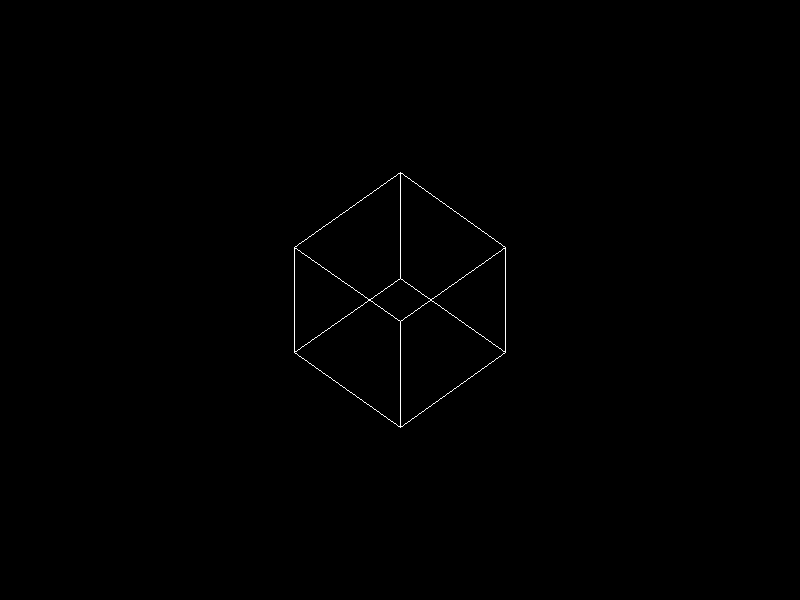
<p>The radial spoke pattern from 0.0.2 is gone. In its place is a tilted cube: twelve white edges on black, readable as three dimensions at a glance.</p>

<p><img src="https://raw.githubusercontent.com/tindandelion/rust-3d-rasterizer/0.0.3/doc/output/current.webp" alt="Current render output" /></p>

<p>Not a demo pattern for line quality anymore — geometry we care about, projected onto the framebuffer.</p>

<p>Let’s talk about projections first.</p>

<h2 id="what-orthographic-projection-is">What orthographic projection is</h2>

<p>Until now we drew directly in <strong>screen space</strong>: endpoints were already pixel coordinates. This milestone is the first time we place geometry in <strong>3D world space</strong> and need a deliberate map from there onto a <strong>2D</strong> bitmap.</p>

<h4 id="why-we-need-projection-at-all">Why we need projection at all</h4>

<p>A rasterizer ultimately writes <strong>pixels</strong>: a flat grid of <code class="language-plaintext highlighter-rouge">(column, row)</code> addresses. Our cube lives in <strong>three</strong> coordinates per vertex — width, height, and depth in the scene. Something has to answer: <em>given a point in the world, which pixel (if any) should we touch?</em></p>

<p>That map is <strong>projection</strong>. In a full renderer it usually sits in a short chain:</p>

<ol>
  <li><strong>Model</strong> — put mesh vertices where the object sits (position, rotation, scale).</li>
  <li><strong>View</strong> — express the scene relative to the camera (where the eye is, which way it looks).</li>
  <li><strong>Projection</strong> — collapse the remaining depth information into the 2D image plane (orthographic or perspective).</li>
  <li><strong>Viewport</strong> — scale and shift into framebuffer pixels (our <strong>800×600</strong> grid, Y flip, aspect correction).</li>
</ol>

<p>We are only partway into that chain in 0.0.3 — fixed view, minimal projection, viewport math in <a href="https://github.com/tindandelion/rust-3d-rasterizer/blob/0.0.3/src/ortho_camera.rs#L1"><code class="language-plaintext highlighter-rouge">ortho_camera</code></a> — but the question is the same: <strong>3D in, 2D out</strong>. Without projection, we would have to hand-place every line in pixel space and could not rotate a cube in world coordinates.</p>

<p>In practice the two <a href="https://en.wikipedia.org/wiki/3D_projection">3D projection</a> types you meet most often are <strong>orthographic</strong> (parallel view rays) and <strong>perspective</strong> (rays through an eye). This milestone uses orthographic; we will add perspective for the cube later.</p>

<h4 id="what-orthographic-projection-does">What orthographic projection does</h4>

<p><a href="https://en.wikipedia.org/wiki/Orthographic_projection">Orthographic projection</a> is the parallel case.</p>

<ul>
  <li>Imagine <strong>view rays</strong> all perpendicular to the image plane — like a very distant viewer where lines of sight never converge.</li>
  <li>A point is projected by sliding it along its ray until it hits the plane. <strong>Depth along the view direction does not change where the point lands on the plane</strong> — only the position <em>within</em> that plane matters.</li>
</ul>

<p>Equivalently: drop the coordinate along the view axis and keep the other two. In our conventions (<strong>+Z</strong> forward, camera looking down <strong>+Z</strong>), screen position depends on <strong>x</strong> and <strong>y</strong> only; moving a vertex forward or backward along <strong>z</strong> does not slide it left or right or up and down on the image.</p>

<p>That is why orthographic views feel like <strong>technical drawings</strong> or <strong>blueprints</strong>: parallel edges in the world stay parallel on screen, and objects do not grow larger when they move closer. Two cubes at different depths but the same <strong>(x, y)</strong> paint the same pixel. There is no vanishing point and no foreshortening from distance.</p>

<p><a href="https://en.wikipedia.org/wiki/3D_projection#Perspective_projection">Perspective projection</a> does the opposite: rays meet at the eye, distant objects look smaller, and parallel lines (railroad tracks) appear to converge. For now, orthographic matches “true size on the drawing sheet” and keeps the math small while we wire up transforms and tests.</p>

<h2 id="from-lines-to-a-scene">From lines to a scene</h2>

<p>The rendering loop stays small. We keep <a href="https://github.com/tindandelion/rust-3d-rasterizer/blob/0.0.3/src/framebuffer.rs#L51"><code class="language-plaintext highlighter-rouge">draw_line</code></a> from 0.0.2; <a href="https://github.com/tindandelion/rust-3d-rasterizer/blob/0.0.3/src/main.rs#L53"><code class="language-plaintext highlighter-rouge">main</code></a> now owns the scene:</p>

<ul>
  <li><strong>eight</strong> corner vertices in model space (<code class="language-plaintext highlighter-rouge">CUBE_VERTS</code>, edge length <strong>0.5</strong> centered at the origin),</li>
  <li><strong>twelve</strong> undirected edge pairs (<code class="language-plaintext highlighter-rouge">CUBE_EDGES</code>),</li>
  <li>for each edge: rotate the cube, transform both endpoints with <a href="https://github.com/tindandelion/rust-3d-rasterizer/blob/0.0.3/src/ortho_camera.rs#L63"><code class="language-plaintext highlighter-rouge">Camera::transform</code></a>, then rasterize.</li>
</ul>

<p><a href="https://github.com/tindandelion/rust-3d-rasterizer/blob/0.0.3/src/main.rs#L72"><code class="language-plaintext highlighter-rouge">draw_cube_wireframe</code></a> walks that edge list. No triangle fill, no depth buffer — only segments.</p>

<p>We also added <a href="https://docs.rs/glam/latest/glam/">glam</a> for <code class="language-plaintext highlighter-rouge">Vec3</code>, <code class="language-plaintext highlighter-rouge">Mat3</code>, <code class="language-plaintext highlighter-rouge">Mat4</code>, and <code class="language-plaintext highlighter-rouge">UVec2</code>. The custom <code class="language-plaintext highlighter-rouge">Point(u32, u32)</code> wrapper went away; pixel endpoints are <a href="https://docs.rs/glam/latest/glam/struct.UVec2.html"><code class="language-plaintext highlighter-rouge">glam::UVec2</code></a> end to end so types stay consistent as the scene grows.</p>

<h2 id="why-the-cube-must-be-tilted">Why the cube must be tilted</h2>

<p>Our 0.0.3 orthographic path ignores <strong>z</strong> when placing pixels (see below). Without a model rotation, an axis-aligned cube collapses: the front face fills the square, and edges that differ only in <strong>z</strong> share the same <strong>(x, y)</strong> — they never show up.</p>

<p>We tried a face-on, axis-aligned pass first to sanity-check aspect ratio (one square on screen — expected). The shipped pose tilts the cube <strong>π/4</strong> about <strong>Y</strong>, then <strong>X</strong> (<code class="language-plaintext highlighter-rouge">Mat3::from_rotation_x * Mat3::from_rotation_y</code>), documented in <a href="https://github.com/tindandelion/rust-3d-rasterizer/blob/0.0.3/src/main.rs#L72"><code class="language-plaintext highlighter-rouge">draw_cube_wireframe</code></a>. That is enough for depth-only edges to appear while the camera math stays simple.</p>

<p>The camera stays fixed for this release; only the model rotation changes the picture.</p>

<h2 id="mapping-world-space-to-the-framebuffer">Mapping world space to the framebuffer</h2>

<p>Module <a href="https://github.com/tindandelion/rust-3d-rasterizer/blob/0.0.3/src/ortho_camera.rs#L1"><code class="language-plaintext highlighter-rouge">ortho_camera</code></a> defines a <a href="https://github.com/tindandelion/rust-3d-rasterizer/blob/0.0.3/src/ortho_camera.rs#L44"><code class="language-plaintext highlighter-rouge">Camera</code></a> built once per framebuffer size. It maps <strong>world coordinates → pixel coordinates</strong> under conventions documented in the module: left-handed scene, <strong>+Y</strong> up, <strong>+Z</strong> forward, bitmap origin top-left with <strong>+y</strong> down.</p>

<h4 id="a-deliberately-simple-camera">A deliberately simple camera</h4>

<p>We are not building a general camera system yet. The scene assumes one fixed pose, aligned with the <a href="https://github.com/tindandelion/rust-3d-rasterizer/blob/main/doc/planning/project-spec.md">project spec</a>:</p>

<ul>
  <li><strong>Eye</strong> at <strong>(0, 0, −1)</strong></li>
  <li><strong>Look-at</strong> the origin <strong>(0, 0, 0)</strong></li>
  <li><strong>Up</strong> along <strong>+Y</strong></li>
</ul>

<p>One unit back on <strong>−Z</strong>, looking down <strong>+Z</strong>, sky in <strong>+Y</strong>. There is no <code class="language-plaintext highlighter-rouge">look_at</code> view matrix in code — with this pose, <strong>world <code class="language-plaintext highlighter-rouge">x</code> and <code class="language-plaintext highlighter-rouge">y</code> feed projection as-is</strong>, and <strong><code class="language-plaintext highlighter-rouge">z</code> is dropped</strong> for screen placement.</p>

<p><a href="https://github.com/tindandelion/rust-3d-rasterizer/blob/0.0.3/src/ortho_camera.rs#L63"><code class="language-plaintext highlighter-rouge">Camera::transform</code></a> still does the framebuffer work: <strong>scale</strong> (shared factor from the shorter edge, centered), <strong>flip <code class="language-plaintext highlighter-rouge">y</code></strong> (bitmap rows grow downward), <strong>round</strong> to integers. The simplification is the <strong>fixed camera pose</strong>, not skipping viewport math.</p>

<p>We chose that on purpose. Movable eyes, arbitrary targets, and full view matrices are useful later, but they add sign conventions we do not need while learning wireframes. For now: rotate the cube in model space, project <strong>xy</strong>, draw lines. We may add <code class="language-plaintext highlighter-rouge">look_at</code>, orthographic frustum boxes, or a moving viewpoint once the pipeline feels familiar.</p>

<h4 id="aspect-ratio">Aspect ratio</h4>

<p>Early on we hit <strong>aspect distortion</strong>: mapping <strong>[-1, 1]²</strong> independently onto <strong>800×600</strong> stretches a world-square into a <strong>4:3</strong> rectangle. The fix uses one scale from the <strong>shorter</strong> edge, centered:</p>

<div class="language-text highlighter-rouge"><div class="highlight"><pre class="highlight"><code>scale = min(width − 1, height − 1) / 2
px    = world.x * scale + (width − 1) / 2
py    = −world.y * scale + (height − 1) / 2
</code></pre></div></div>

<p>On a non-square viewport that letterboxes or pillarboxes so equal world spans along <strong>x</strong> and <strong>y</strong> occupy equal pixel spans.</p>

<p>Under the hood this is a precomputed <a href="https://docs.rs/glam/latest/glam/f32/struct.Mat4.html"><code class="language-plaintext highlighter-rouge">Mat4</code></a> (<code class="language-plaintext highlighter-rouge">ndc_viewport_matrix</code>): homogeneous multiply, then <code class="language-plaintext highlighter-rouge">round</code>. Same mapping, clearer composition when we add more matrix stages.</p>

<p>A unit test (<code class="language-plaintext highlighter-rouge">world_z_shift_does_not_change_screen_xy</code>) locks in that <strong>z</strong> does not affect <strong>xy</strong> pixels yet — no depth buffer in this milestone.</p>

<h2 id="how-we-got-here">How we got here</h2>

<p>Between 0.0.2 and 0.0.3 we explored orthographic projection the hard way: integration tests, NDC conventions, viewport mapping, even depth packing — then peeled back scope when the milestone picture cleared.</p>

<p>There was briefly a richer stack: mesh modules, triangle soup, wireframe edges from triangulation, <code class="language-plaintext highlighter-rouge">look_at_lh</code>, orthographic frustum parameters, fractional line endpoints, a golden WebP with JSON metadata. Sergey kept the tests, planning notes, and reference image, but <strong>deleted the implementation</strong> and rebuilt step by step rather than inheriting a large diff.</p>

<p>Version 0.0.3 is that slimmer rebuild: cube data in <code class="language-plaintext highlighter-rouge">main</code>, projection in <code class="language-plaintext highlighter-rouge">ortho_camera</code>, the line rasterizer unchanged. Same diary lesson as before — use agents heavily, but own the code you will maintain six months from now.</p>

<h2 id="testing-the-full-scene">Testing the full scene</h2>

<p>Line tests still use ASCII art helpers. For the whole image we compare decoded <strong>RGBA</strong> bytes against a committed snapshot at <a href="https://github.com/tindandelion/rust-3d-rasterizer/blob/0.0.3/snapshots/cube/scene.webp"><code class="language-plaintext highlighter-rouge">snapshots/cube/scene.webp</code></a>.</p>

<p>Regenerate after intentional visual changes:</p>

<div class="language-bash highlighter-rouge"><div class="highlight"><pre class="highlight"><code>cargo run <span class="nt">--quiet</span> <span class="nt">--</span> snapshots/cube/scene.webp
</code></pre></div></div>

<p>Two levels of feedback again: local geometry in unit tests, pixel-exact scene stability at integration scope.</p>

<h2 id="what-this-version-unlocks">What this version unlocks</h2>

<p>We now have the orthographic wireframe backbone from the <a href="https://github.com/tindandelion/rust-3d-rasterizer/blob/main/doc/planning/project-breakdown.md">milestone breakdown</a>: fixed camera, twelve edges, one model orientation, still image only.</p>

<p>Not in 0.0.3 yet: animation, perspective, filled triangles, depth buffer, culling, or lighting.</p>

<p>Next up was <strong>animated orthographic wireframe</strong> — <a href="/rust-3d-rasterizer//2026/05/16/the-cube-starts-spinning.html">the cube starts spinning in the follow-up post</a>. After that: perspective, then filled raster with depth.</p>]]></content><author><name></name></author><summary type="html"><![CDATA[We shipped the third milestone of the rasterizer. Version 0.0.1 proved the export path; Version 0.0.2 gave us dependable line segments. Version 0.0.3 is what we have been building toward since then: a wireframe cube in orthographic projection, exported as the same 800×600 lossless WebP still image.]]></summary></entry><entry><title type="html">Lines Without Guesswork</title><link href="https://tindandelion.com/rust-3d-rasterizer/2026/05/11/lines-without-guesswork.html" rel="alternate" type="text/html" title="Lines Without Guesswork" /><published>2026-05-11T06:50:00+00:00</published><updated>2026-05-11T06:50:00+00:00</updated><id>https://tindandelion.com/rust-3d-rasterizer/2026/05/11/lines-without-guesswork</id><content type="html" xml:base="https://tindandelion.com/rust-3d-rasterizer/2026/05/11/lines-without-guesswork.html"><![CDATA[<p>We shipped the second milestone of the rasterizer. This one feels like a real step forward: instead of writing one known pixel, we now draw full line segments across the framebuffer and export the result as a valid lossless WebP.</p>

<p><a href="https://github.com/tindandelion/rust-3d-rasterizer/tree/0.0.2" class="no-github-icon">Version 0.0.2 on GitHub</a></p>

<h2 id="what-changed-in-practice">What changed in practice</h2>

<p><a href="/rust-3d-rasterizer//2026/05/10/one-white-pixel.html">Version 0.0.1</a> proved the output pipeline. Version 0.0.2 expands our drawing capability from single points to full line segments. The key change is a line primitive, <a href="https://github.com/tindandelion/rust-3d-rasterizer/blob/0.0.2/src/framebuffer.rs#L52"><code class="language-plaintext highlighter-rouge">draw_line</code></a>, implemented on top of the existing framebuffer and guarded <a href="https://github.com/tindandelion/rust-3d-rasterizer/blob/0.0.2/src/framebuffer.rs#L39"><code class="language-plaintext highlighter-rouge">set_pixel</code></a>.</p>

<p>The result is still intentionally simple and easy to inspect:</p>

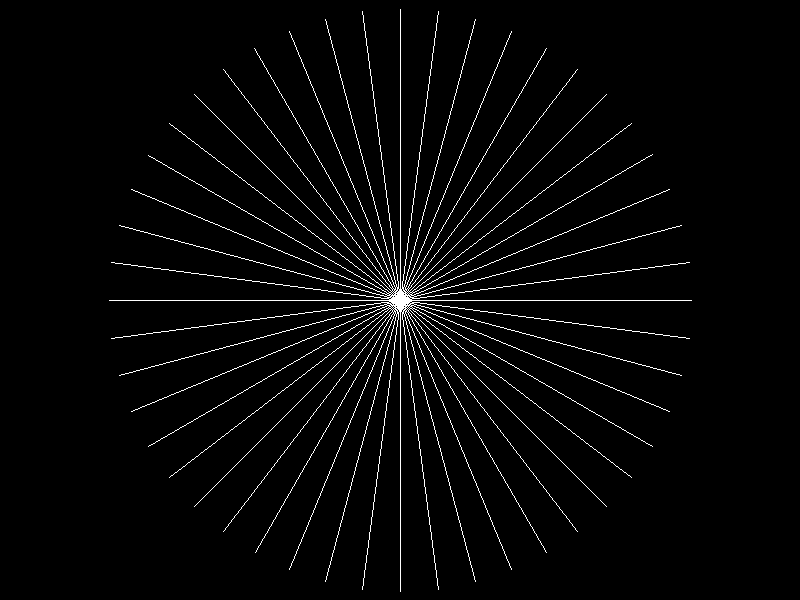
<p><img src="https://raw.githubusercontent.com/tindandelion/rust-3d-rasterizer/0.0.2/doc/output/current.webp" alt="Current render output" /></p>

<h2 id="line-drawing-algorithm">Line drawing algorithm</h2>

<p>A notable decision in this milestone was the line algorithm itself. We briefly had an integer Bresenham path while iterating, then switched to DDA: <strong>Digital Differential Analyzer</strong>.</p>

<p>This was also a deliberate learning choice from Sergey: instead of spending time learning Bresenham in depth right away (a nice exercise, but not our focus right now), we picked the approach that felt closer to the math. We acknowledged this is likely a performance penalty versus a tighter integer-heavy implementation, but at this stage that cost is not very important for us. Better to use an algorithm we understand clearly, then optimize later if profiling says it matters.</p>

<h4 id="what-dda-is">What DDA is</h4>

<p>A Digital Differential Analyzer is a way to turn a continuous curve into discrete pixel steps. For line drawing, it works like this:</p>

<ul>
  <li>treat the segment as a parametric function over $t \in [0,1]$</li>
  <li>sample $t$ at evenly spaced values</li>
  <li>compute continuous $(x,y)$ at each sample</li>
  <li>round to the nearest pixel and plot it</li>
</ul>

<h4 id="dda-implementation-for-lines">DDA implementation for lines</h4>

<p>The math is small but useful. Given endpoints $P_0 = (x_0, y_0)$ and $P_1 = (x_1, y_1)$, define:</p>

\[\Delta x = x_1 - x_0,\quad
\Delta y = y_1 - y_0,\quad
N = \max(\lvert\Delta x\rvert, \lvert\Delta y\rvert).\]

<p>Here, $N$ is the number of equal sampling intervals we use along the segment (so we evaluate $N+1$ points including both endpoints). We choose $N$ based on the <em>dominant axis</em>.</p>

<p>By dominant axis, we mean the coordinate that changes more over the whole segment:</p>

<ul>
  <li>if $\lvert\Delta x\rvert \ge \lvert\Delta y\rvert$, the line is more horizontal, so $x$ is dominant</li>
  <li>if $\lvert\Delta y\rvert &gt; \lvert\Delta x\rvert$, the line is more vertical, so $y$ is dominant.</li>
</ul>

<p>For example, from $(2,3)$ to $(12,7)$ we have $\Delta x=10$ and $\Delta y=4$, so $x$ is dominant and we use $N=10$. From $(5,1)$ to $(8,13)$ we have $\Delta x=3$ and $\Delta y=12$, so $y$ is dominant and we use $N=12$.</p>

<p>First, let’s write the segment in parametric form for each coordinate:</p>

\[\begin{cases}
x(t) = x_0 + \Delta x\,t \\
y(t) = y_0 + \Delta y\,t
\end{cases}
\qquad t \in [0,1].\]

<p>Then sample:</p>

\[t_i = \frac{i}{N}\ \text{for}\ i = 0,1,\dots,N\ \ (\text{so } t_i \in [0,1]),\qquad
x_i = x_0 + \Delta x \cdot t_i,\qquad
y_i = y_0 + \Delta y \cdot t_i.\]

<p>Each $(x_i, y_i)$ is still continuous (floating point), so rasterization needs one more decision: map to a pixel center. Here we use rounding:</p>

\[p^x_i = \operatorname{round}(x_i),\qquad
p^y_i = \operatorname{round}(y_i).\]

<p>Those integer $(p^x_i, p^y_i)$ coordinates are what <a href="https://github.com/tindandelion/rust-3d-rasterizer/blob/0.0.2/src/framebuffer.rs#L39"><code class="language-plaintext highlighter-rouge">set_pixel</code></a> writes. Because $i$ runs from $0$ through $N$, the segment is endpoint-inclusive by construction.</p>

<p>The key intuition is that $N = \max(\lvert\Delta x\rvert, \lvert\Delta y\rvert)$ guarantees we advance no more than one pixel per step along the dominant axis, which avoids visible gaps in the rasterized line. If a rounded sample lands outside the framebuffer, <code class="language-plaintext highlighter-rouge">set_pixel</code> safely ignores it, so we get simple clipping behavior without a separate clipping algorithm yet.</p>

<p>For this milestone, that trade-off is exactly what we wanted: readable geometry-first code, predictable testable output, and a direct bridge from line equations to pixels before we optimize anything.</p>

<h2 id="testing-the-shape-not-just-the-function">Testing the shape, not just the function</h2>

<p>This milestone also improved tests in a useful way. Instead of only checking individual bytes, we added several line-focused unit tests and a tiny ASCII view helper so expected pixel patterns are readable at a glance.</p>

<p>That gave us confidence in the cases that matter right now:</p>

<ul>
  <li>horizontal, vertical, and diagonal segments,</li>
  <li>endpoint inclusivity (forward and reverse),</li>
  <li>clipping behavior when endpoints land outside the framebuffer.</li>
</ul>

<p>Here is the style of unit test we used to verify shape directly:</p>

<div class="language-rust highlighter-rouge"><div class="highlight"><pre class="highlight"><code><span class="nd">#[test]</span>
<span class="k">fn</span> <span class="nf">draw_diagonal_line_slope_one</span><span class="p">()</span> <span class="p">{</span>
    <span class="k">let</span> <span class="k">mut</span> <span class="n">fb</span> <span class="o">=</span> <span class="nn">FrameBuffer</span><span class="p">::</span><span class="nf">new</span><span class="p">(</span><span class="mi">10</span><span class="p">,</span> <span class="mi">5</span><span class="p">);</span>
    <span class="n">fb</span><span class="nf">.draw_line</span><span class="p">(</span><span class="nf">Point</span><span class="p">(</span><span class="mi">1</span><span class="p">,</span> <span class="mi">0</span><span class="p">),</span> <span class="nf">Point</span><span class="p">(</span><span class="mi">4</span><span class="p">,</span> <span class="mi">3</span><span class="p">),</span> <span class="nn">Rgb</span><span class="p">::</span><span class="n">WHITE</span><span class="p">);</span>

    <span class="nd">#[rustfmt::skip]</span>
    <span class="k">let</span> <span class="n">expected</span> <span class="o">=</span> <span class="nd">concat!</span><span class="p">(</span>
        <span class="s">" +        "</span><span class="p">,</span>
        <span class="s">"  +       "</span><span class="p">,</span>
        <span class="s">"   +      "</span><span class="p">,</span>
        <span class="s">"    +     "</span><span class="p">,</span>
        <span class="s">"          "</span><span class="p">,</span>
    <span class="p">);</span>
    <span class="nd">assert_eq!</span><span class="p">(</span><span class="n">fb</span><span class="nf">.to_ascii_art</span><span class="p">(),</span> <span class="n">expected</span><span class="p">);</span>
<span class="p">}</span>
</code></pre></div></div>

<p>This style made expected output much easier to read in code review than raw byte arrays. It also made adding new test cases faster: in many cases, we only needed to change the expected ASCII pattern while keeping the same assertion structure.</p>

<p>The broader integration test still verifies that the binary writes a decodable WebP, so we keep both levels of feedback: local geometry correctness and end-to-end artifact validity.</p>

<h2 id="why-the-new-output-uses-radial-spokes">Why the new output uses radial spokes</h2>

<p>The rendered scene is now a radial-spoke pattern: many segments from the image center to a circle. In code, that happens in <a href="https://github.com/tindandelion/rust-3d-rasterizer/blob/0.0.2/src/main.rs#L38"><code class="language-plaintext highlighter-rouge">draw_flower</code></a> by iterating angles over the entire circle and issuing one <code class="language-plaintext highlighter-rouge">draw_line</code> per spoke.</p>

<p>We originally discussed a crossed square for this milestone. That remains a good regression-style scene, but the radial image turned out to be better for quick visual checks:</p>

<ul>
  <li>missing pixels are obvious,</li>
  <li>endpoint handling is easier to spot,</li>
  <li>small directional asymmetries stand out immediately.</li>
</ul>

<p>The original plan, a crossed square, would not give us enough visual feedback on line quality. A few simple vertical, horizontal, and diagonal lines provide less information than many radial directions. So Sergey chose to switch the output to radial spokes.</p>

<h2 id="what-this-version-unlocks">What this version unlocks</h2>

<p>This release does not yet include projection, meshes, or triangle filling. But it gives us a dependable primitive that all of that will rely on. The next milestone was orthographic cube projection, where this line path becomes the first wireframe backbone instead of a standalone demo — we shipped that in <a href="/rust-3d-rasterizer//2026/05/15/a-cube-takes-shape.html">a cube takes shape</a>.</p>]]></content><author><name></name></author><summary type="html"><![CDATA[We shipped the second milestone of the rasterizer. This one feels like a real step forward: instead of writing one known pixel, we now draw full line segments across the framebuffer and export the result as a valid lossless WebP.]]></summary></entry><entry><title type="html">One White Pixel</title><link href="https://tindandelion.com/rust-3d-rasterizer/2026/05/10/one-white-pixel.html" rel="alternate" type="text/html" title="One White Pixel" /><published>2026-05-10T09:00:00+00:00</published><updated>2026-05-10T09:00:00+00:00</updated><id>https://tindandelion.com/rust-3d-rasterizer/2026/05/10/one-white-pixel</id><content type="html" xml:base="https://tindandelion.com/rust-3d-rasterizer/2026/05/10/one-white-pixel.html"><![CDATA[<p>We shipped the first milestone of the rasterizer: <strong>version 0.0.1</strong>. It is intentionally tiny. The program writes an 800x600 lossless <a href="https://en.wikipedia.org/wiki/WebP">WebP</a> image with a single white pixel at the center. That is not much of a renderer yet, but it is enough to prove the first important thing: we can own a framebuffer in Rust, put pixels into it, encode it, write it to disk, and verify that the resulting file is a real image.</p>

<p>That makes it a good first checkpoint.</p>

<p><a href="https://github.com/tindandelion/rust-3d-rasterizer/tree/0.0.1" class="no-github-icon">Version 0.0.1 on GitHub</a></p>

<h2 id="what-you-will-see">What you will see</h2>

<p>Take a look at the center of this image: do you see a white dot? That’s it!</p>

<p><img src="/rust-3d-rasterizer/assets/images/scene-0.0.1.webp" alt="One white pixel" /></p>

<h2 id="why-start-with-webp">Why Start With WebP?</h2>

<p>The original <a href="https://github.com/tindandelion/rust-3d-rasterizer/blob/main/doc/planning/project-spec.md">project plan</a> is about learning 3D <a href="https://en.wikipedia.org/wiki/Rasterisation">rasterization</a>: line drawing, projection, cubes, filled triangles, depth buffering, shading, and eventually more complex shapes. But before any of that, we needed an output path.</p>

<p>Sergey chose a deliberately small first step: instead of jumping straight to a cube, or even a line, we would write a still image. At first, the idea was a full black frame. Then we grew it into the planned <a href="https://github.com/tindandelion/rust-3d-rasterizer/blob/main/doc/planning/project-breakdown.md">milestone artifact</a>: a black 800x600 image with a single visible center pixel.</p>

<p>This matters because rasterizers are easy to debug poorly. If the only way to observe the program is through internal buffers or <code class="language-plaintext highlighter-rouge">println!</code>, then every later bug becomes harder to reason about. A browser-displayable image gives us a simple feedback loop:</p>

<ol>
  <li>render into memory,</li>
  <li>encode the framebuffer,</li>
  <li>open the file,</li>
  <li>trust that what we see corresponds to the bytes we produced.</li>
</ol>

<p>The first milestone was therefore not “draw something impressive.” It was “make future drawing work observable.”</p>

<h2 id="the-first-shape-a-framebuffer">The First Shape: A Framebuffer</h2>

<p>The earliest version allocated raw pixel bytes directly in <a href="https://github.com/tindandelion/rust-3d-rasterizer/blob/main/src/main.rs"><code class="language-plaintext highlighter-rouge">main</code></a>. That worked for the all-black image, but it made the wrong thing central. <code class="language-plaintext highlighter-rouge">main</code> should coordinate the program: choose the dimensions, choose the output path, ask the encoder to write the result. It should not be the long-term home of pixel storage rules.</p>

<p>So we extracted a <a href="https://github.com/tindandelion/rust-3d-rasterizer/blob/main/src/framebuffer.rs#L6"><code class="language-plaintext highlighter-rouge">FrameBuffer</code></a>.</p>

<p>The framebuffer currently stores RGB bytes: three <code class="language-plaintext highlighter-rouge">u8</code> values per pixel, row-major, fixed dimensions supplied at construction time. The constructor zero-fills the buffer, which gives us a black image by default. On top of that, we added a tiny color type, <a href="https://github.com/tindandelion/rust-3d-rasterizer/blob/main/src/framebuffer.rs#L3"><code class="language-plaintext highlighter-rouge">Rgb</code></a>:</p>

<div class="language-rust highlighter-rouge"><div class="highlight"><pre class="highlight"><code><span class="nf">Rgb</span><span class="p">(</span><span class="k">pub</span> <span class="nb">u8</span><span class="p">,</span> <span class="k">pub</span> <span class="nb">u8</span><span class="p">,</span> <span class="k">pub</span> <span class="nb">u8</span><span class="p">)</span>
</code></pre></div></div>

<p>and the first drawing primitive, <a href="https://github.com/tindandelion/rust-3d-rasterizer/blob/main/src/framebuffer.rs#L22"><code class="language-plaintext highlighter-rouge">set_pixel</code></a>:</p>

<div class="language-rust highlighter-rouge"><div class="highlight"><pre class="highlight"><code><span class="nf">set_pixel</span><span class="p">(</span><span class="n">x</span><span class="p">,</span> <span class="n">y</span><span class="p">,</span> <span class="n">color</span><span class="p">)</span>
</code></pre></div></div>

<p>There is already a design choice hiding in that small API. If a caller tries to write outside the image, <code class="language-plaintext highlighter-rouge">set_pixel</code> silently ignores the request. That matches the current rasterization plan: early drawing code can be simple and skip out-of-bounds writes without doing full clipping. Later line drawing will benefit from that. A line can step through points and ask the framebuffer to write each one; points outside the canvas simply do not land.</p>

<p>This is not a universal answer. Some projects should return errors or assert on invalid coordinates. For this rasterizer, at this stage, “skip-only” is the cleaner primitive.</p>

<h2 id="encoding-still-image-first-animation-later">Encoding: Still Image First, Animation Later</h2>

<p>The output path uses the <a href="https://crates.io/crates/webp-animation"><code class="language-plaintext highlighter-rouge">webp-animation</code></a> crate, even for the still image. That may look odd at first: why use an animation encoder for a single frame?</p>

<p>The reason is continuity. The project plan calls for still WebP images first, then animated WebP clips once we start rotating cubes. Using the same crate now means the still path and the future animation path share the same basic machinery.</p>

<p>There was one small trap here: frame timestamps.</p>

<p>The underlying encoder expects strictly increasing timestamps. For a one-frame image, we still need to add a frame and finalize the stream with a valid end timestamp. We wrapped that in a <a href="https://github.com/tindandelion/rust-3d-rasterizer/blob/main/src/webp_encoder.rs#L6"><code class="language-plaintext highlighter-rouge">WebpEncoder</code></a> type that owns the timestamp counter. The public API can stay simple:</p>

<ul>
  <li>create an encoder with width and height,</li>
  <li>add a frame,</li>
  <li>write the file.</li>
</ul>

<p>Internally, it handles timestamps as <code class="language-plaintext highlighter-rouge">0, 1, 2, ...</code> milliseconds and finalizes with at least <code class="language-plaintext highlighter-rouge">1</code> millisecond so a single-frame image is valid. We briefly tried removing the counter and hard-coding a timestamp, but that only made sense for one frame. Sergey asked to roll that back, which was the right call: even in version 0.0.1, the API should point toward the animation milestone instead of painting us into a corner.</p>

<h2 id="testing-the-artifact-not-just-the-code">Testing the Artifact, Not Just the Code</h2>

<p>A useful part of this milestone was deciding what kind of test belongs here.</p>

<p>We did not add golden image tests yet. Pixel-perfect image regression tests are useful, but they also introduce friction: fixture files, decode paths, update workflows, and false confidence if the asserted artifact is too narrow. The planning docs explicitly defer those until eyeballing stops being enough.</p>

<p>Instead, we added an <a href="https://github.com/tindandelion/rust-3d-rasterizer/blob/main/tests/binary_writes_valid_webp.rs#L27">integration test</a> that runs the real binary in a temporary directory and decodes the output WebP. The test checks the most important promise at this layer:</p>

<ul>
  <li>the command succeeds,</li>
  <li>the output file exists where requested,</li>
  <li>the file is valid WebP.</li>
</ul>

<p>This gives us a good middle ground. We are not trying to freeze every byte of the encoded file. We are checking that the program a user runs produces a valid artifact with the expected semantic content.</p>

<p>There was also a small Cargo detail: integration tests can find the compiled binary via <a href="https://github.com/tindandelion/rust-3d-rasterizer/blob/main/tests/binary_writes_valid_webp.rs#L12"><code class="language-plaintext highlighter-rouge">CARGO_BIN_EXE_&lt;target&gt;</code></a>. We chose to require that Cargo-provided path instead of maintaining a filesystem fallback based on the test executable location. That keeps the test honest: it is a <code class="language-plaintext highlighter-rouge">cargo test</code> integration test, not a general-purpose binary locator.</p>

<h2 id="pair-programming-notes">Pair Programming Notes</h2>

<p>This project is also an experiment in AI-assisted programming, so the process matters as much as the code.</p>

<p>The milestone had a useful rhythm:</p>

<ul>
  <li>Sergey kept the target small and concrete.</li>
  <li>Cursor proposed structure and tests.</li>
  <li>Sergey pushed back when an abstraction or fallback did not match the desired direction.</li>
  <li>Cursor adjusted the implementation and captured the reasoning in session notes.</li>
</ul>

<p>That back-and-forth already shaped the code. For example, the output path started with an opaque black frame, moved through RGBA details, then settled into an RGB framebuffer feeding a WebP encoder. The <code class="language-plaintext highlighter-rouge">FrameBuffer</code> API narrowed after discussion: no width/height getters just because they were easy to add, no redundant out-of-bounds test once the simpler invariant was enough, no binary-location fallback once the Cargo contract was clear.</p>

<p>Those are small choices, but they are exactly the kind of choices that keep a learning project from turning into a pile of plausible-looking code.</p>

<h2 id="what-001-means">What 0.0.1 Means</h2>

<p>Version 0.0.1 does not yet contain line rasterization, projection, meshes, cameras, or shading.</p>

<p>It gives us the base surface those things will use:</p>

<ul>
  <li>a framebuffer with explicit RGB storage,</li>
  <li>a minimal pixel-writing operation,</li>
  <li>a lossless WebP export path,</li>
  <li>a command-line output filename,</li>
  <li>unit tests for buffer behavior,</li>
  <li>an integration test that proves the binary writes a decodable image.</li>
</ul>

<p>Most importantly, it gives us a visible artifact:</p>

<blockquote>
  <p>a black 800x600 image with one white pixel in the center.</p>
</blockquote>

<p>That pixel is the first sign that bytes are flowing through the whole pipeline correctly.</p>

<p>Next up: <a href="/rust-3d-rasterizer//2026/05/11/lines-without-guesswork.html">drawing lines</a>. The next milestone is a crossed square, which should turn <code class="language-plaintext highlighter-rouge">set_pixel</code> from a sanity-check helper into the foundation for the first real rasterization algorithm.</p>]]></content><author><name></name></author><summary type="html"><![CDATA[We shipped the first milestone of the rasterizer: version 0.0.1. It is intentionally tiny. The program writes an 800x600 lossless WebP image with a single white pixel at the center. That is not much of a renderer yet, but it is enough to prove the first important thing: we can own a framebuffer in Rust, put pixels into it, encode it, write it to disk, and verify that the resulting file is a real image.]]></summary></entry></feed>